Blog - Orvador

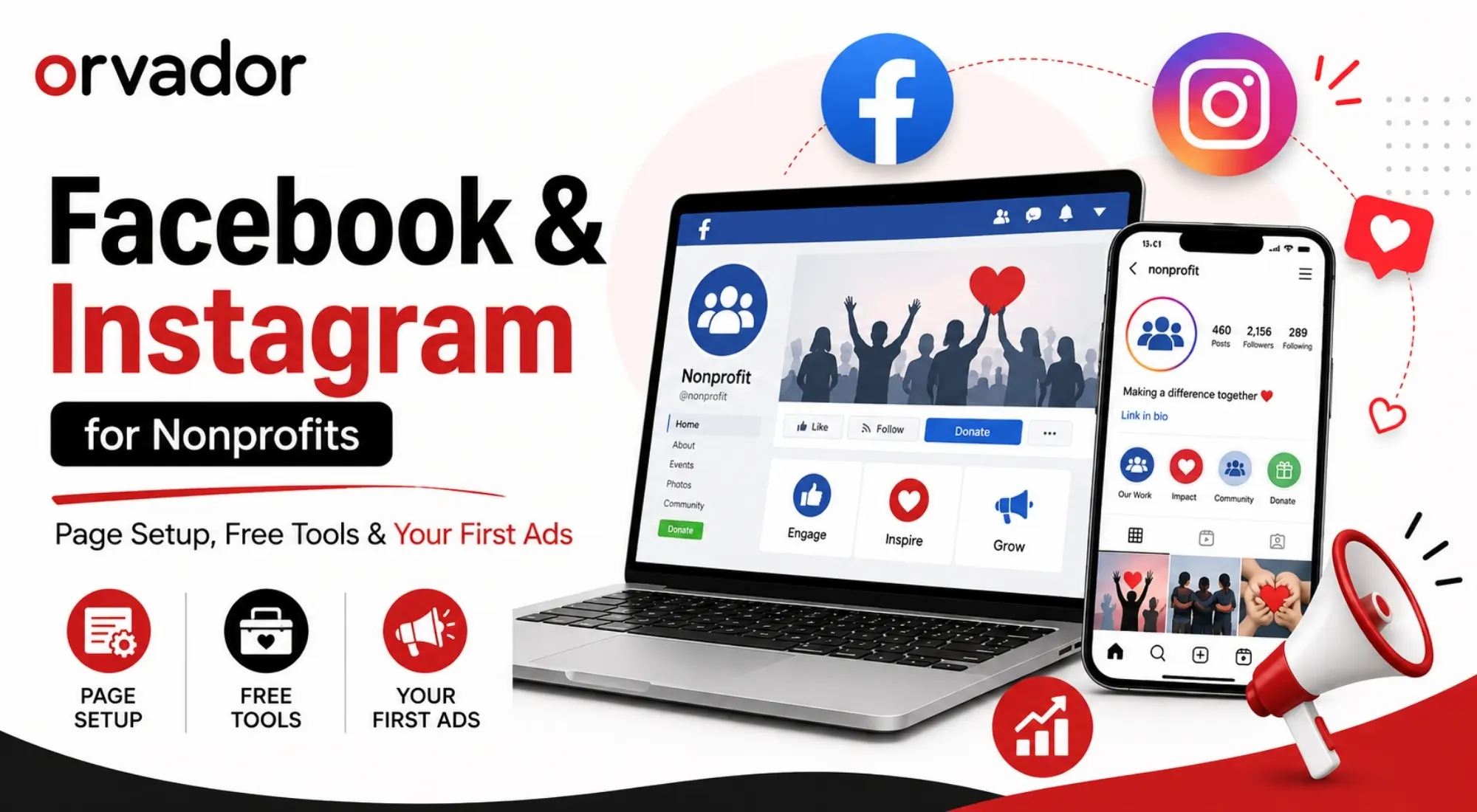
Facebook & Instagram for Nonprofits: Page Setup, Free Tools & Your First Ads

TL;DR: Creating a Facebook Page for your nonprofit can take as little as 20 minutes. The bigger opportunity, though, comes from getting your organization verified for Meta’s nonprofit benefits, including donation tools, Ad Grants, and discounted advertising. This guide covers the whole process—from setting up your nonprofit Facebook Page and getting verified to building a strong Instagram presence and putting your first $100 into Facebook ads. You’ll also learn how to choose the right campaign objective so your limited ad budget actually works toward your nonprofit’s goals. 

1. Setting Up a Nonprofit Facebook Page (Step by Step)

Setting up a nonprofit Facebook Page is fairly simple, but the choices you make at the beginning can make a big difference later. If you want access to Meta’s nonprofit-specific tools and features, it’s worth getting the basics right from the start.

Step 1: Create the Page, not a personal profile. Go to Facebook > Create > Page. Choose the “Cause or Community” or “Nonprofit Organization” category. This is what flags your account for nonprofit-specific tools during verification.

Step 2: Use your legal registered name. Meta compares the name on your Facebook Page with the legal name listed in your organization’s registration records, such as an EIN in the US or the equivalent registration number in another country. Even a small mismatch can cause problems, and name inconsistencies are one of the most common reasons nonprofit verification requests are turned down.

Step 3: Complete your profile fully. Add your mission statement in the “About” section, a logo as your profile photo, and a cover image that reflects your current campaign. Pages with incomplete profiles see noticeably lower organic reach.

Step 4: Add admins carefully. Assign at least two admins (your ED or board chair, plus your marketing lead) so account access never depends on one person. Meta increasingly requires two-factor authentication for admin roles, so set this up now rather than during a crisis.

Step 5: Claim your custom URL. Once your Page hits 25 likes, you can set a custom URL (facebook.com/yourorgname). This matters more than it sounds. It’s what you’ll print on annual reports, event signage, and donor mailers.

2. Getting Verified & Accessing Meta’s Nonprofit Tools

This is the step most nonprofits skip, and the one that unlocks everything else. Facebook for nonprofits isn’t just a Page category; it’s a verification status that opens access to Meta’s Social Impact tools.

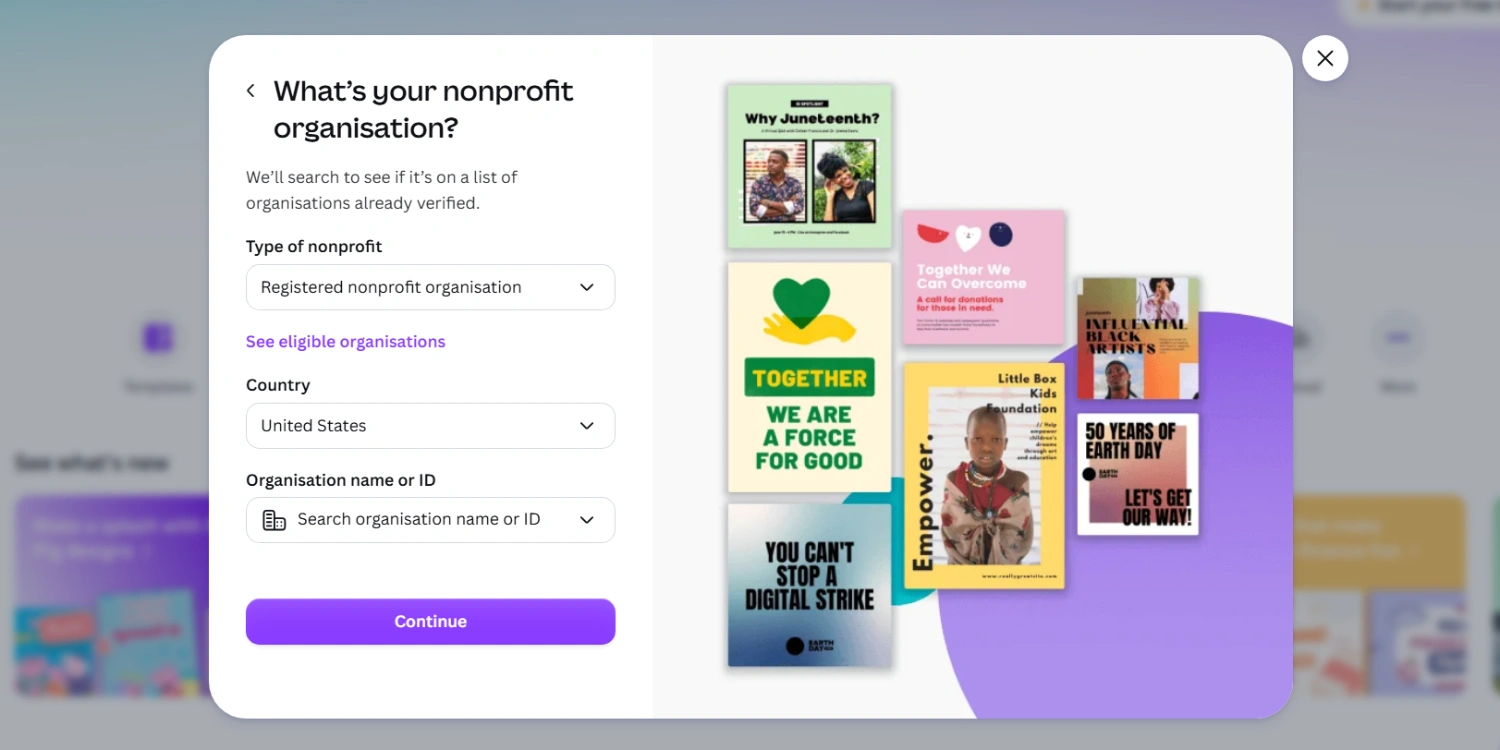
To get started, your organization needs to complete a free registration through one of Meta’s nonprofit partners, such as TechSoup or Percent, depending on where your organization is based. Once your application is approved, you’ll have access to:

  • Donate buttons directly on your Page and in posts, with zero platform fees on most donations
  • Fundraiser tools, including birthday fundraisers and peer-to-peer campaigns run by supporters
  • The Meta Business Suite nonprofit dashboard, which centralizes Page, Instagram, and ad account management in one place
  • Eligibility for the Facebook Ad Grants program in supported countries, offering discounted or matched ad credit

Verification typically takes 5-10 business days. Keep your registration documents (proof of nonprofit status, tax ID) ready before you apply. Incomplete submissions are the most common cause of delay.

3. Instagram for Nonprofits: Profile, Highlights, Link Strategy

Instagram for nonprofits works best as a visual extension of your Facebook presence, not a duplicate feed. After your Facebook Page is verified, connect your Instagram Business account through Meta Business Suite. This keeps both platforms connected, making it easier to use Meta’s nonprofit tools and manage your ads from the same account.

A few setup essentials:

  • Switch to a Business or Creator account (not personal). This is required for donation stickers, insights, and ad access.
  • Use Highlights strategically. Create dedicated Highlight covers for “Our Impact,” “Ways to Give,” “Volunteer,” and “In the News.” This is where new visitors go first, and it directly influences whether they scroll or leave.
  • Solve the link problem. Instagram only allows one clickable link in your bio. Use a link-in-bio tool (Linktree, or Meta’s own “Link in Bio” feature within Business Suite) to route visitors to your donation page, current campaign, or volunteer signup, all from a single tap.
  • Add the donation sticker to Stories. Verified nonprofits can add a donate sticker directly to Instagram Stories, letting supporters give without leaving the app.

Cross-posting from Facebook to Instagram is fine for reach, but reformat your captions. Instagram audiences respond better to shorter, more visual storytelling than Facebook’s longer-form posts.

4. Your First $100 in Meta Ads: Campaign Setup for Donations

Running Facebook ads for nonprofits for the first time doesn’t require a big budget. It requires the right objective. Here’s a simple $100 test campaign structure:

  1. Set the objective to “Sales” or “Leads,” not “Awareness.” If your goal is donations, choose the objective that optimizes for conversions on your donation page, not impressions.
  2. Install the Meta Pixel on your donation page before you spend a dollar. Without it, Meta can’t learn who’s converting, and your second campaign will underperform.
  3. Target warm audiences first. Upload your existing email/donor list as a Custom Audience, or retarget people who’ve visited your website in the last 30 days. Cold audiences convert far less efficiently for a first campaign.
  4. Run one ad set, two creatives. Test a photo-led ad against a short video (15-30 seconds) with the same copy. Let the campaign run at least 4-5 days before judging results — Meta’s algorithm needs a learning period.
  5. Use Ad Grant credit where eligible to stretch your test budget further, and reinvest whatever converts well into a slightly larger second campaign.

A $100 test won’t fill your pipeline, but it will tell you which creative, audience, and message combination is worth scaling, which is far more valuable than a bigger budget spent blind.

5. Common Meta Account Issues Nonprofits Hit (and Fixes)

  • Page or ad account suspended without warning. Usually tied to policy flags around fundraising language (“donate now,” “urgent,” “match my gift”) triggering automated review. Appeal through Meta Business Suite’s Support Inbox and avoid resubmitting identical ad copy immediately.
  • Verification rejected. Almost always a name/registration mismatch. Re-check that your Page name matches your legal registration exactly, including punctuation.
  • Donate button missing after verification. This can take 24-48 hours to sync after approval. If it’s still missing after 3 days, contact Meta’s nonprofit support directly rather than resubmitting.
  • Ad account locked over payment verification. Common when a new admin is added mid-campaign. Keep payment methods and billing admin roles stable during active campaigns.
  • Low organic reach despite an active Page. Often a signal to shift budget toward paid, since Meta increasingly limits organic reach for Pages posting purely promotional content.

Need Meta Ads Managed? Setting up the account is one thing, running campaigns that consistently convert is another. If you’d rather hand off strategy, creative testing, and budget optimization, talk to our paid team about managing your Facebook and Instagram ads end to end.

Related reading: see our [social media strategy guide for nonprofits] for how to plan content across both platforms, and visit our nonprofit digital marketing hub for the full cluster.

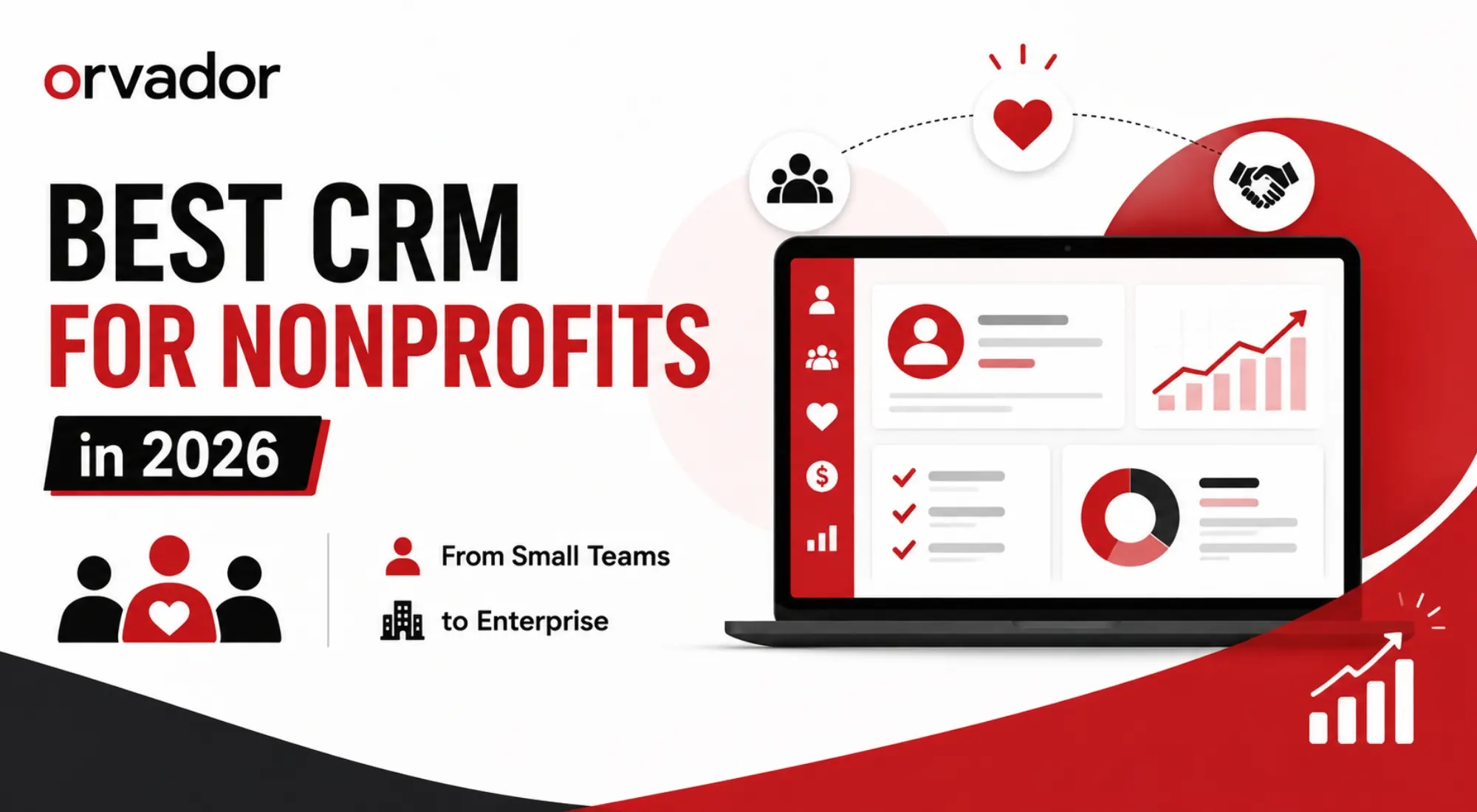
Best CRM for Nonprofits in 2026: Compared for Small Teams to Enterprise

TL;DR: A nonprofit CRM is not the same as a donor database. A CRM manages relationships across donors, volunteers, and program participants, while a donor database is narrower and transaction-focused. For small teams and startups, a free CRM for nonprofits (HubSpot’s free tier or Salesforce’s 10 free licenses) is often enough to start. Mid-sized organizations tend to land on Bloomerang, Neon CRM, or Donor Perfect for the best mix of donor features and price. Enterprise nonprofits with $3M+ budgets and dedicated IT usually need Salesforce Nonprofit Cloud or Blackbaud. Below, we score the top contenders on price, donor features, automation, and support, then walk through a 30-day plan to roll out whichever CRM for nonprofits you choose.

CRM vs Donor Database: What’s the Difference

Before comparing tools, it helps to clear up a mix-up that trips up a lot of nonprofit teams: a CRM and a donor database aren’t interchangeable terms, even though vendors use them loosely.

donor database is built around one relationship type – the donor. It tracks gifts, pledges, acknowledgment letters, and giving history. Tools that started life as pure donor databases (think early DonorPerfect or Raiser’s Edge) are excellent at gift accounting but weren’t originally designed to manage volunteers, program participants, or advocacy contacts in the same system.

A nonprofit CRM, by contrast, is built around the constituent – anyone your organization interacts with, whether they’ve ever given a dollar or not. A modern CRM for nonprofits unifies donors, volunteers, event attendees, board members, grant officers, and program beneficiaries into a single record, so a volunteer who becomes a monthly donor doesn’t show up as two disconnected people in your system.

In practice, the line has blurred. Most platforms marketed today as a “nonprofit CRM” (Bloomerang, Neon CRM, Virtuous, Salesforce Nonprofit Cloud) now include donor-database functionality plus relationship management, marketing automation, and reporting on top. If you’re comparing a CRM for non profit organizations against a standalone donor database, ask one question: does it need to manage more than gift history? If yes, you want a full CRM, not just a ledger of donations. We cover this distinction and how to migrate from a spreadsheet or legacy database in more depth in our companion guide to building a nonprofit donor database. 

Scoring Criteria: Price, Donor Features, Automations, Support

To keep this comparison honest rather than just repeating vendor marketing copy, we scored every platform on four criteria that matter most to nonprofit ops teams:

Price. Not just the sticker price, but total cost of ownership: implementation, per-user fees, payment processing fees on donations (usually 2.2%-3.5%), and whether the platform requires a paid consultant to configure. A cheap monthly fee that needs a $30,000 implementation isn’t actually cheap.

Donor features. Recurring gift management, pledge tracking, LYBUNT/SYBUNT reporting (donors who gave Last Year But Unfortunately Not This year, and Some Years But Unfortunately Not This year), soft credits, major-gift pipelines, and tax receipting. This is where a nonprofit CRM earns its keep over a generic sales CRM.

Automations. Donor journeys triggered by giving behavior, automated acknowledgment emails, lapsed-donor re-engagement sequences, and increasingly, AI-assisted donor scoring that flags who’s likely to upgrade or lapse.

Support. Onboarding quality, training resources, and whether you get a human during migration. This is the single biggest predictor of whether a CRM rollout actually sticks or gets abandoned six months in.

We weighted these roughly evenly, but if your team is under five people, price and support should carry more weight than advanced automation you won’t have capacity to use anyway.

The Contenders Compared (Table + Mini-Reviews)

Here’s how the most commonly searched-for CRM for nonprofits platforms stack up in 2026.

Platform Best For Starting Price Donor Features Automation Support
Bloomerang Donor retention, small-to-mid orgs ~$125–$150/mo Strong Engagement Score, retention dashboard Good Excellent onboarding
Neon CRM Membership + events + fundraising in one ~$99/mo Strong Unlimited users/records Good Solid, self-serve heavy
DonorPerfect Reporting depth, tech-confident teams ~$99/mo Very strong Mature Moderate Good, dated UI
Little Green Light Small nonprofits, tight budgets ~$45/mo Good Simple Basic Friendly, small-team feel
Virtuous Responsive/personalized fundraising ~$5,000–$15,000/yr Strong AI donor scoring Excellent Good, needs data maturity
HubSpot Flexible CRM with marketing tools Free–$$$ Basic Not nonprofit-native Excellent General marketing Self-serve + paid tiers
Salesforce Nonprofit Cloud Enterprise, complex multi-department orgs 10 free licenses, then $30K–$100K+ Very strong Fully customizable Excellent Agentforce AI Requires consultants
Blackbaud Raiser's Edge NXT Large fundraising teams, major gifts Enterprise, $3,000+/yr Very strong Legacy standard Good Strong but pricier

Bloomerang consistently comes up as the answer when the question is “what’s the best CRM for nonprofits focused on keeping donors, not just acquiring them.” Its Engagement Score and retention dashboards are purpose-built rather than bolted on, and onboarding is widely praised – a real factor when your team doesn’t have a dedicated database administrator.

Neon CRM is the pick if your organization runs memberships, chapters, or a mix of ticketed events and recurring donations. Unlimited users and records at a flat mid-tier price make it attractive for growing teams that don’t want per-seat costs to punish them for adding staff.

DonorPerfect has served tens of thousands of organizations over four decades and remains a strong choice for teams that want deep reporting and don’t mind a less modern interface. It’s a workhorse rather than a design showcase.

Little Green Light earns its spot for volunteer-run or very small nonprofits. It’s the CRM equivalent of a well-organized filing cabinet: simple, affordable, and not trying to be everything.

Virtuous leans into “responsive fundraising,” using AI to help gift officers prioritize outreach and personalize donor communications at scale. It rewards organizations with clean, mature data; it’s less forgiving if your donor records are messy.

HubSpot isn’t purpose-built for nonprofits, but its free tier is genuinely generous. Unlimited contacts and users at no cost, which makes it a reasonable stepping-stone CRM for non profit teams that mainly need contact management, email tracking, and a simple pipeline before they’re ready for donor-specific tooling.

Salesforce Nonprofit Cloud (the successor to the legacy Nonprofit Success Pack) is the enterprise standard. Salesforce.org’s Power of Us Program still grants ten free licenses to eligible 501(c)(3)s, but the free licenses don’t include nonprofit-specific configuration. You’re paying for implementation, which is where costs balloon into five and six figures. It’s the right call if you have IT capacity and multi-department complexity; it’s overkill for a five-person team.

Blackbaud Raiser’s Edge NXT remains the legacy heavyweight for large development shops running major-gift programs, though its pricing and learning curve put it out of reach for most small-to-mid organizations.

Best Free CRM Options for Nonprofits

If budget is the binding constraint, there are real, usable free CRM for nonprofits options in 2026, not just watered-down trial versions.

HubSpot’s free CRM is the most generous free tier on the market: unlimited contacts, unlimited users, a visual pipeline, and basic email tracking, permanently free with no seat cap. It’s not built around donor-specific workflows like pledges or soft credits, but for an organization migrating off spreadsheets for the first time, it’s a legitimate place to start.

Salesforce’s Power of Us Program gives eligible nonprofits ten free Nonprofit Cloud or Sales/Service Cloud licenses. This is enterprise-grade software at no license cost, but “free” only covers the licenses, not the configuration. Budget for implementation help unless you have in-house Salesforce expertise on staff or board.

Givebutter offers a free CRM paired with its fundraising platform, funded by optional donor tips rather than platform fees. It’s a strong fit if the bulk of your fundraising already happens online and you want fundraising and constituent tracking in one free tool.

CiviCRM is open-source and free to install, which appeals to tech-savvy teams willing to self-host and maintain it. There’s no license cost, but you’re trading dollars for the technical skill needed to run and update it.

For most small nonprofits searching for a free crm for nonprofits, the realistic starting point is HubSpot (contact management) or Givebutter (if fundraising-led), with a plan to graduate to a donor-native CRM like Bloomerang or Neon once gift volume and reporting needs outgrow the free tier.

Implementation: 30-Day Rollout Plan

Picking the right nonprofit CRM is half the job. The other half is not letting the rollout stall. Here’s a realistic 30-day plan:

Days 1-5: Data audit and cleanup. Export your existing donor/contact data (from spreadsheets, a legacy database, or your fundraising platform) and clean it before it touches a new system. Standardize name formats, remove duplicates, and flag incomplete records. Migrating messy data into a clean CRM just gives you a messy CRM.

Days 6-10: Field mapping and configuration. Map your existing fields (donor type, campaign codes, soft credits) to the new platform’s data model. Decide what’s mandatory versus optional at data entry. Over-requiring fields is the fastest way to get staff to stop using the system properly.

Days 11-15: Migration and testing. Import a test batch first, not your full database. Check that gift histories, pledges, and constituent relationships (household links, employer matches) came across correctly before running the full migration.

Days 16-20: Automation and workflow setup. Build your first automated sequences – acknowledgment emails, lapsed-donor flags, recurring gift reminders. Start with two or three workflows rather than trying to automate everything on day one.

Days 21-25: Staff training. Run role-specific training: development staff need gift entry and reporting; program staff need volunteer or participant tracking; leadership needs dashboard access. A CRM only pays off if the people using it daily are confident in it.

Days 26-30: Go-live and review. Run parallel systems for your final week if possible, sunset the old system, and schedule a 60-day check-in to catch adoption gaps before they become permanent workarounds.

Still not sure which CRM fits your team?

Choosing between a dozen platforms with overlapping features and confusing pricing pages isn’t something you should have to figure out alone, especially when the wrong choice costs months of migration time you don’t have back. Get unbiased help picking your CRM with a free call with Orvador’s nonprofit strategy team. We’ll walk through your team size, donor volume, and budget, and tell you honestly which platform fits – no vendor kickbacks, no upsell.

Book your free CRM consultation →
Related reading: How to Leverage Generative AI to Write Grant Proposals That Win · Nonprofit Donor Database Guide

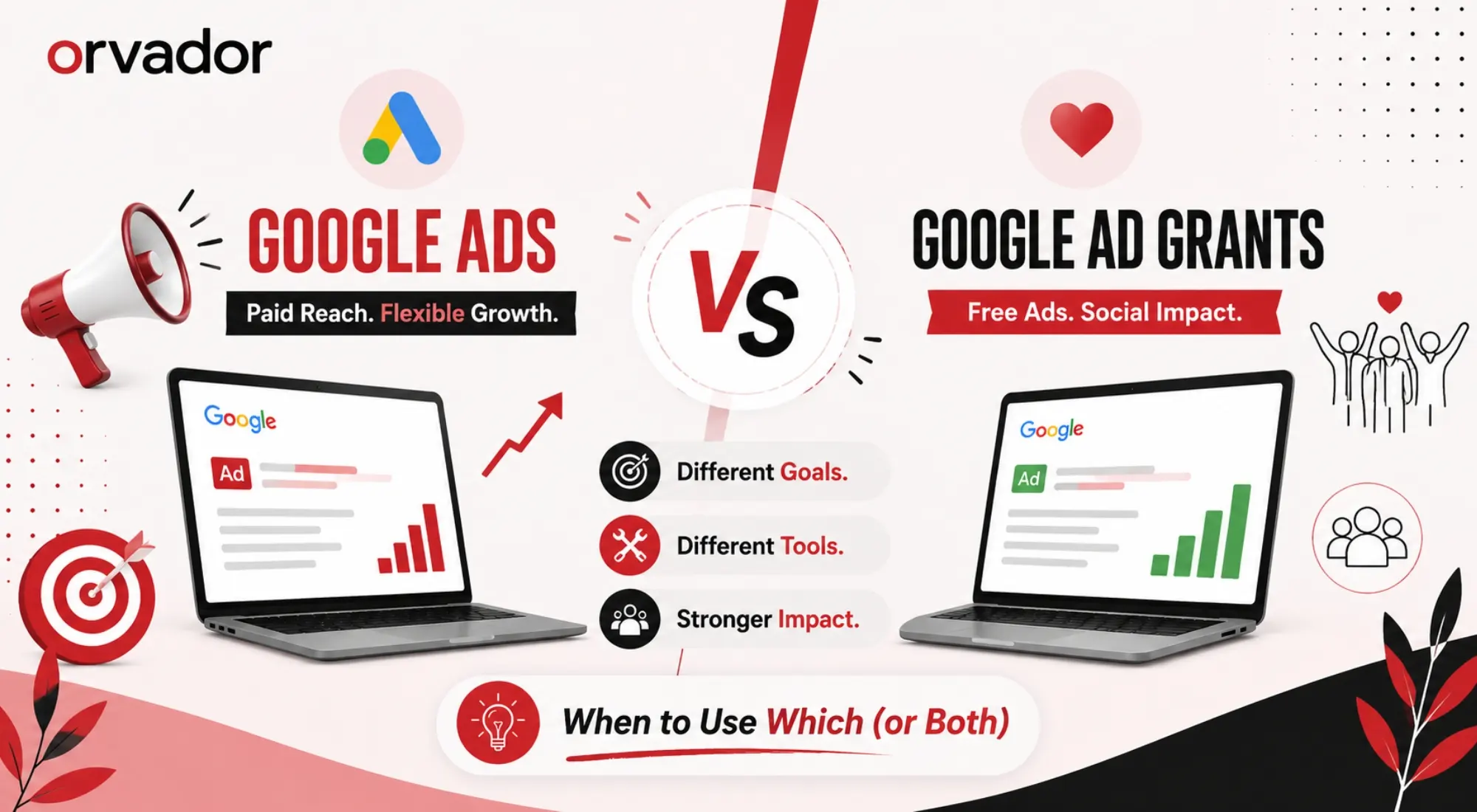
Google Ads vs Google Ad Grants for Nonprofits: When to Use Which (or Both)

TL;DR: Google Ad Grants gives eligible nonprofits $10,000/month in free search ad credit, but it comes with a $2 CPC cap, text-ad-only formats, and strict compliance rules that limit reach on competitive terms. Paid Google Ads for nonprofits removes the bid cap and unlocks Display, Video, Shopping, and Performance Max, but it costs real money. Most well-run NGO accounts don’t pick one over the other; they run a hybrid model, using the Grant for awareness and long-tail search, and paid budget for high-intent, donation-focused keywords the Grant can’t win. Below, we break down the core differences, what the $2 CPC cap actually means for your keyword strategy, and a real account structure from our own NGO clients.

Ad Grants vs Paid Ads: The Core Differences (Bids, Formats, Rules)

Ad Grants vs Paid Ads

On the surface, Google Ad Grants and standard Google Ads for nonprofits look similar. Both run on the same auction, both show up on the Google search results page, and both are managed from a Google Ads account. The differences show up once you start building campaigns.

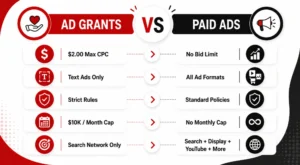
Bidding. Ad Grants accounts are capped at manual CPC bidding with a $2.00 maximum per click (Maximize Conversions can push past this ceiling once conversion tracking is set up, which we’ll cover below). Paid Google Ads accounts have no such cap. You can bid whatever a keyword is worth to your organization.

Formats. Grant-funded campaigns are restricted to text ads on the Search Network only. No Display, no YouTube, no Shopping, no Performance Max, no image or video creative. A google adwords nonprofit grant account simply cannot buy those placements, regardless of budget, because the grant funds Search only.

Compliance rules. Google holds Grant accounts to a higher bar than paid accounts: a minimum 5% click-through rate maintained monthly, at least two ad groups per campaign, at least two ads per ad group, sitelink extensions, geo-targeting, and conversion tracking, among other requirements. Miss these consistently and Google can suspend the account. Paid accounts have none of these grant-specific rules. You’re only bound by standard Google Ads policies.

Budget caps. The Grant is fixed at $10,000/month, distributed as roughly $329/day. Paid Google Ads has no monthly ceiling beyond what you’re willing to spend, which is the trade-off at the center of any google ads non profit budgeting decision.

Understood together, these differences explain why so many nonprofits treat the Grant as a foundation layer rather than a complete acquisition channel. It’s free, but it’s also the most constrained ad product Google offers.

What the $2 CPC Cap Means for Your Keywords

The $2.00 manual bid cap is the single biggest factor shaping what a Grant account can and can’t do. In low-competition niches (a regional literacy program, a hyperlocal shelter, a small environmental charity), $2.00 is often enough to win impressions on relevant terms. In competitive categories, it isn’t close.

Search terms like “donate to children’s charity,” “volunteer opportunities near me,” or category terms tied to health, disaster relief, or well-funded advocacy causes routinely see real auction CPCs well above $2.00, sometimes into double digits. At the manual bid cap, a Grant campaign simply loses those auctions to advertisers, commercial and nonprofit alike, bidding $5, $10, or more.

There are two ways around the ceiling, and both matter for how you plan a google ads non profit keyword strategy:

  • Long-tail and low-competition keywords. Multi-word, specific phrases (“volunteer with a literacy nonprofit in [city],” “how to donate school supplies to NGO”) have lower auction pressure and convert at the $2 cap far more often than short, high-volume head terms.
  • Maximize Conversions bidding. Once you have conversion tracking (donations, sign-ups, volunteer form fills) properly configured, Google allows Grant accounts to switch from manual CPC to Maximize Conversions, which is exempt from the $2 cap. This is the single biggest lever for extracting more value from a Grant account, and it’s also the step most underused NGO accounts skip.

Even with Maximize Conversions enabled, the Grant account is still working within a fixed $10,000 monthly ceiling and Search-only formats. That’s the structural limit paid Google Ads for nonprofits is built to solve.

When Grants Alone Are Enough, and When They’re Not

For a lot of smaller or newly formed organizations, the Grant genuinely is enough, at least at first. If your cause sits in a low-competition niche, your primary goal is awareness or brand search protection rather than volume donations, and your website converts reasonably well, $10,000 in monthly ad credit can outperform anything a modest paid budget would buy elsewhere.

Grants alone tend to fall short in a few recurring situations:

  • High-competition categories. Health nonprofits, disaster relief organizations, and major national causes are bidding against well-funded commercial advertisers and other NGOs for the same head terms. The $2 cap (even with Maximize Conversions) can’t consistently outbid that field.
  • Time-sensitive campaigns. Emergency appeals, matching-gift windows, and year-end giving pushes need to scale spend and impressions immediately. A Grant account, bound by its monthly ceiling and CTR compliance requirements, isn’t built for a sudden spike.
  • Non-search formats. If your strategy depends on retargeting website visitors, running video pre-roll, or using Shopping ads for a nonprofit retail arm, none of that is available inside the Grant; it’s Search-only by design.
  • Donor acquisition at scale. The Grant is genuinely strong for top-of-funnel awareness and branded search, but converting cold traffic into recurring donors at volume usually needs a paid budget with more flexible bidding and formats.

For a deeper walkthrough of setting up and structuring a Grant account from scratch, our guide on Google Ad Grants for nonprofits covers eligibility, application steps, and account setup in detail, worth reading first if you haven’t launched a Grant yet.

The Hybrid Model: Grants for Awareness, Paid for Donations

The organizations getting the most out of Google’s ad ecosystem rarely pick a side. They run a hybrid model that assigns each channel to the job it’s actually good at.

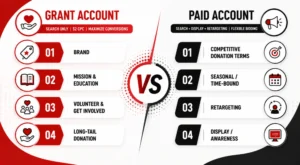
Grant account role: top-of-funnel awareness, brand protection (bidding on your own organization’s name so competitors and confused searchers don’t land elsewhere), educational content promotion, volunteer recruitment, and long-tail informational queries where the $2 cap isn’t a constraint.

Paid account role: competitive donation and fundraising keywords where CPCs exceed $2, time-bound campaigns (year-end giving, emergency appeals, matching gift periods), retargeting site visitors who didn’t convert, and any Display, video, or Shopping format the Grant can’t touch.

The two accounts also feed each other. Grant-driven traffic that engages with blog content or program pages becomes a retargeting audience for paid campaigns. Search terms that perform well but keep losing the $2 auction in the Grant account are strong candidates to move into paid, where they can actually win impression share. This is standard practice across google ads for nonprofits strategy at any organization running both channels seriously, and it’s the structure we recommend to nearly every NGO client once their Grant account is stable.

Our Educate Girls case study shows this in practice – a hybrid approach that combined high Grant utilization for awareness with paid channels driving one-time and monthly donor growth, resulting in a 2x ROAS from paid spend alongside 90% Grant utilization.

Also Read: How Nonprofits Can Use Google Ad Grants to Drive Impact

Real Structure Example From Our NGO Accounts

NGO Accounts

Here’s a simplified version of the account structure we use across several nonprofit clients, adapted from real campaigns without disclosing client-specific budgets:

Grant account (Search, $2 CPC / Maximize Conversions):

  • Campaign 1 – Brand: organization name, misspellings, “[org name] reviews,” “[org name] donate”
  • Campaign 2 – Mission & Education: informational queries tied to the cause (“what is [issue] and how to help,” “[issue] statistics”)
  • Campaign 3 – Volunteer & Get Involved: “volunteer with [cause] NGO,” “internships at nonprofit [sector]”
  • Campaign 4 – Long-tail Donation: specific, lower-competition giving queries (“donate school kits to rural children,” “sponsor a child’s education India”)

Paid account (Search + Display + retargeting, flexible bidding):

  • Campaign 1 – Competitive Donation Terms: high-CPC head terms losing the Grant auction (“donate to education charity,” “child sponsorship program”)
  • Campaign 2 – Seasonal/Time-bound: year-end giving, Giving Tuesday, disaster response appeals
  • Campaign 3 – Retargeting: website visitors, blog readers, abandoned donation-form users
  • Campaign 4 – Display/Awareness: banner placements on relevant content networks for cold-audience reach

This structure keeps the Grant account fully compliant (adequate ad groups, CTR above 5%, active conversion tracking) while directing paid spend only at the keywords and formats where it earns a clear return the Grant can’t deliver on its own. It’s a pattern that applies whether you’re running a google adwords nonprofit grant account for the first time or optimizing one that’s been live for years.

Cost Modelling: What Paid Ads Add

Before adding a paid budget on top of a Grant account, it helps to model what that spend actually buys, rather than assuming more budget automatically means more donations.

Start with the gap analysis: pull the Grant account’s Search Terms report and flag keywords with impression share loss due to rank (a Google Ads column that shows how often you’re losing auctions to a low bid or Quality Score). These are the terms where a $2 cap is actively costing you visibility, and they’re the first candidates for paid budget.

From there, a simple cost model looks at:

  • Estimated CPC for the target keyword set – pull actual auction data from Google Ads’ Keyword Planner or your existing Search campaigns, not the flat $2 Grant ceiling.
  • Expected conversion rate from historic Grant or organic performance on similar intent keywords.
  • Cost per acquisition (CPA) – budget divided by expected conversions, compared against average gift value and, for monthly donors, expected lifetime value.
  • Incremental reach – how much of the competitive keyword set the Grant is currently losing, and what percentage a modest paid budget (even ₹15,000–₹50,000/month or a few hundred dollars) could realistically recover.

In our experience managing both Grant and paid accounts for NGO clients, even a modest paid budget layered on top of a well-optimized Grant account tends to outperform doubling down on Grant-only tactics, simply because it’s targeting the exact keywords the $2 cap is currently blocking. The Grant remains the larger dollar value on paper ($120,000/year in credit), but paid spend is what converts the keywords the Grant structurally can’t reach.

Not sure whether your current Google Ads or Ad Grant account is structured to actually convert? Get a free Ad Account Structure Review from Orvador’s NGO team, and we’ll show you exactly where your Grant is underperforming and where paid budget would move the needle.

GivingTuesday Ideas for Nonprofits: Campaign Playbook + 6-Week Timeline

TL;DR: GivingTuesday 2026 falls on December 1, and it remains an important starting point for year-end giving for nonprofits of every size. This guide breaks down 12 practical GivingTuesday campaign ideas for nonprofits by budget, a 6-week countdown timeline you can turn into a checklist, ready-to-use email and social templates, and a plan for matching gifts and corporate tie-ins. If you’re searching for GivingTuesday 2026 ideas or trying to build your first GivingTuesday nonprofit campaign, start here, then use the timeline to work backward from December 1. For a full year-round strategy, see our Fundraising & Donor Growth guide.

Why GivingTuesday Still Works (The Numbers)

Some nonprofits have started asking whether GivingTuesday has peaked. The data suggests otherwise; the way people participate is simply changing. Recent GivingTuesday campaigns have pushed total US donations past $4 billion in a single day, and the event has generated well over $20 billion cumulatively since it began in 2012. That’s not a niche trend; it’s one of the largest coordinated giving days on the calendar.

What has changed is donor behavior. Total dollars raised continue to climb even as the number of individual donors has softened slightly. That means today’s GivingTuesday nonprofit campaigns are less about reaching the widest possible audience and more about activating the right supporters — your existing list, your board’s network, and your most engaged monthly donors — with a message specific enough to encourage a gift.

There’s also a retention angle that smaller nonprofits often overlook. A large share of donors who set up a recurring gift on GivingTuesday go on to make a second gift before the year ends, and December as a whole typically accounts for more than a third of annual online giving, with the final week alone driving another meaningful chunk. In other words, GivingTuesday isn’t just a single-day event; it can be the starting point for your entire year-end campaign.

For a nonprofit deciding whether to invest staff time in GivingTuesday 2026, the numbers support running a campaign at whatever size your team can realistically sustain. Even a modest, well-timed campaign can outperform a rushed, larger one.

12 GivingTuesday Campaign Ideas by Budget Level

GivingTuesday Campaign Ideas by Budget Level

Not every organization has an agency, a designer, and a CRM automation team. These GivingTuesday campaign ideas are grouped so you can choose what fits your capacity, rather than trying to replicate what looks good in someone else’s case study.

No-to-low budget (1–2 staff, existing tools only)

  1. A single, specific ask email – Instead of a generic appeal, name one clear outcome the gift funds (e.g., “$40 covers one week of meals for a family”).
  2. A text-to-give link shared across existing channels, paired with a countdown graphic made in a free design tool.
  3. A pledge drive where supporters commit publicly before December 1, creating social proof that builds throughout the week.
  4. A “thank a donor” social series that reposts past supporter stories. It requires little production but can create a strong emotional connection.

Moderate budget (small paid boost, some design support)

  1. A matching-gift campaign anchored by one board member or local business doubling gifts up to a set cap.
  2. A social media fundraiser using platform-native donation tools (Facebook, Instagram) to reduce the number of clicks needed to make a gift.
  3. A direct mail + email combo for donors over 55, who still respond strongly to physical appeals paired with a digital follow-up.
  4. A themed hourly challenge (e.g., “Give by noon and unlock a bonus match”) that creates urgency without requiring new technology.

Higher budget (peer-to-peer, video, paid media)

  1. A peer-to-peer fundraiser where supporters build personal pages. This can bring in new-to-file donors who may trust a friend’s personal ask more than an institutional one.
  2. A short video appeal (60–90 seconds) featuring a beneficiary or staff member, run as both organic content and light paid promotion.
  3. A virtual event or livestream tied to the day, giving major and mid-level donors a reason to show up in real time.
  4. A corporate matching gift portal integration that automatically flags employees whose employers will match their gifts. For organizations with the right donor base, this can be one of the highest-ROI additions to a GivingTuesday nonprofit campaign.

The best GivingTuesday campaigns don’t necessarily have the biggest budgets or the most elaborate creative. They usually have a clear goal, a specific audience, a simple way to give, and a message donors can understand immediately.

The 6-Week Countdown Timeline (Weekly Checklist)

This is the backbone of any GivingTuesday for nonprofits strategy. Work backward from December 1, 2026.

  • Week 6 (mid-October): Set your dollar goal and theme. Confirm whether a matching-gift sponsor is realistic this year. Audit your donation page for mobile speed and one-click giving.
  • Week 5: Segment your email list (new donors, lapsed donors, monthly donors, major donors). Each group needs a different ask, rather than receiving the same blast.
  • Week 4: Draft and internally approve all email and social copy. Build your countdown graphics and any video content now, while there’s still time to make changes or reshoot.
  • Week 3: Recruit board members and top donors to share personal posts or make first gifts as social proof. Schedule “save the date” emails.
  • Week 2: Finalize your matching-gift structure and test your donation form end to end, including on mobile.
  • Week 1 (Thanksgiving week): Send a warm-up email that isn’t an ask — gratitude, an impact story, and a preview of Tuesday’s goal. For nonprofits looking to strengthen their storytelling before the campaign, see our guide on impact storytelling for nonprofits.
  • Day-of (December 1): Execute your posting and email cadence (see next section), and monitor results in real time.
  • Week +1: Send thank-you messages within 48 hours and open the door to converting one-time gifts into recurring ones.

Email & Social Templates You Can Copy

Subject line options: “One day. One goal. Will you join us?” / “Your $[X] gift, doubled today only” / “We’re $[amount] from our GivingTuesday goal”

Email skeleton:

Today is GivingTuesday — a single day when [cause context] gets a real boost. Every gift given before midnight [is matched dollar-for-dollar / helps us reach our goal of $X]. Here’s what your gift does: [one concrete outcome]. [Donate button]. Thank you for being part of this.

Social post skeleton:

It’s GivingTuesday. For the next 24 hours, every dollar you give goes toward [specific outcome]. [Matching gift line, if applicable]. Tap the link to give in under a minute. #GivingTuesday

Keep both short. GivingTuesday inboxes and social feeds are crowded; specificity beats length every time.

Matching Gifts & Corporate Tie-Ins

GivingTuesday matching gifts remain one of the most reliable levers in a GivingTuesday campaign, and corporate matching now represents a meaningful and growing share of overall corporate giving. For nonprofits considering matching funds for GivingTuesday, three tie-in approaches work well:

  • A single sponsor match: One board member, founder, or local business commits to matching gifts up to a fixed dollar amount — simple to communicate and easy to track publicly.
  • Employer matching programs: Many donors don’t realize their employer will match their gift. Adding a matching-gift lookup tool to your donation page, and mentioning it explicitly in your emails, can meaningfully lift your total without requiring you to find new donors.
  • In-kind corporate partnerships: A local business donating a percentage of GivingTuesday sales, or covering your platform fees for the day, stretches your match further without requiring new cash from your own budget.

Whichever structure you choose, name the match amount and the deadline clearly. Vague matching language (“gifts may be matched”) converts far worse than a specific number and a clear countdown.

Day-Of Execution & Real-Time Optimisation

Day-Of Execution & Real-Time Optimisation

On December 1, plan for at least three touchpoints across the day rather than sending one email and calling it done:

  • Morning: Launch email + first social post, framed around the goal and the match.
  • Midday: Share a progress update (“We’re halfway to our goal!”). Momentum messaging consistently works better than simply repeating the original ask.
  • Evening: Send a final push email with urgency language (“6 hours left”) and a last social post thanking early donors by name or number.

Watch your donation form’s conversion rate in real time. If mobile completions are lagging, that’s usually a sign the form has too many required fields. If your platform allows quick edits, it’s a problem you may be able to fix on the day itself.

If a channel is underperforming — say, email opens are strong but social clicks are weak — shift your remaining posting cadence rather than waiting until the next campaign to adjust.

Post-Campaign: Converting One-Time Givers to Monthly

The highest-value work happens after December 1. Send a thank-you within 48 hours — not just a receipt, but a genuine thank-you — and follow it a few days later with an invitation to convert the gift into a recurring one. Frame that invitation around ongoing impact rather than another immediate ask.

Donors who set up recurring gifts around GivingTuesday are notably likely to give again before the year closes, which makes this conversion window one of the most efficient in your entire calendar. Pair this with an update to your donor management workflow so new GivingTuesday donors are tagged and enrolled in a stewardship sequence rather than falling into a generic list.

For a deeper strategy around this stage of the donor journey, see Donor Retention Through Email Automation.

Ready to plan your GivingTuesday campaign?

December 1 comes fast once October hits. Book your GivingTuesday campaign support with Orvador before November and get your 6-week timeline, templates, and matching-gift strategy built and ready to launch.

Generative Engine Optimization for Nonprofits: How to Get Recommended by ChatGPT & AI Search

TL;DR: Donors, volunteers, and grant researchers are increasingly asking ChatGPT, Perplexity, and Google AI Overviews for nonprofit recommendations instead of scrolling search results. Generative Engine Optimization (GEO) is the practice of structuring your content so AI engines can understand, trust, and cite your organization. This guide breaks down how GEO differs from classic SEO for nonprofit websites, what signals AI models use to decide who gets recommended, and a practical checklist covering entities, FAQs, structured data, and digital PR, plus how to measure whether it’s working.

Search Is Changing: Where Donors Ask Questions in 2026

A few years ago, “seo for nonprofit” meant one thing: rank on page one of Google. That’s no longer the whole picture. In 2026, a growing share of donors, volunteers, and even institutional funders start their research inside a chat window, not a search bar. Someone deciding where to give this quarter might simply ask ChatGPT, “which education nonprofits in [region] have the strongest track record?” A program officer scoping grantees might ask an AI assistant to summarize an organization’s impact before ever visiting the website.

This shift matters because generative engines don’t return ten blue links. They return one synthesized answer, often naming two or three organizations by name. If your nonprofit isn’t part of that answer, you’re invisible at the exact moment someone is deciding who to trust. That’s the gap GEO is built to close, and it’s why we’ve made it a standalone service alongside our nonprofit SEO work rather than treating it as an afterthought.

What GEO Is (and How It Differs From Classic SEO)

Generative Engine Optimization is the discipline of optimizing content so large language models (ChatGPT, Claude, Gemini, Perplexity) can accurately extract, understand, and cite it when generating answers. It shares DNA with traditional SEO, but the mechanics diverge in a few important ways.

Classic nonprofit website SEO best practices for 2025 and beyond still matter: fast page speed, clean URL structure, keyword-aligned headings, backlinks. But ranking algorithms and generative engines don’t evaluate content the same way. Search engines rank pages; AI engines extract facts, statistics, and claims from pages and recombine them into a new answer. That means:

  • Clarity beats cleverness. AI models favor content that states facts plainly and early, rather than burying the answer under a long narrative lead-in.
  • Source credibility carries more weight. If your data point is cited elsewhere (a partner site, a press mention, a directory listing), an AI model is more likely to trust and repeat it.
  • Structure is read as meaning. Headings, lists, and tables aren’t just for skimmers anymore; they help language models parse what a section is actually about.

For a nonprofit, this means GEO and SEO for nonprofit organizations should run together, not as competing budgets. Our GEO services for nonprofits are built to sit on top of existing SEO foundations rather than replace them.

How AI Engines Pick Which Nonprofits to Cite

AI Engines

AI for nonprofits isn’t magic; it’s pattern recognition applied at scale. When a generative engine is asked to recommend or describe an organization, it’s pulling from a blend of sources: your own website, third-party mentions (GuideStar/Candid, press coverage, partner nonprofits, review platforms), and structured data markup that explicitly labels who you are and what you do.

A few patterns we’ve observed in how AI engines choose which nonprofits to surface:

  • Named entities win. Organizations that consistently use their full, exact name (not “we” or “our team”) across pages are easier for a model to associate facts with.
  • Specificity beats vagueness. “We’ve provided clean water access to 40,000 people across 12 districts since 2019” is far more citable than “we’ve made a big impact on water access.”
  • Consistency across the web matters. If your mission statement, program numbers, and location differ between your website, your GuideStar profile, and a press release, AI engines struggle to resolve which version is authoritative, and often skip citing you at all.
  • Freshness signals trust. Pages that are clearly dated and recently updated are treated as more reliable than static, undated content.

This is why ChatGPT for nonprofits visibility isn’t just a content problem. It’s a consistency and structure problem that spans your whole digital footprint.

The GEO Checklist: Entities, FAQs, Structured Data, Digital PR

Here’s the practical framework we run for every NGO client moving into GEO.

Entity clarity

  • State your organization’s full legal name, mission, founding year, and service area explicitly on your About page, not just in a tagline.
  • Use the same entity name and phrasing consistently across your website, social bios, and third-party listings.
  • Name your programs specifically (with proper nouns) rather than describing them generically.

FAQ-formatted content

  • Add a genuine FAQ section to key pages, phrased as real questions donors and volunteers ask (“How is my donation used?” “Is [org] a registered 501(c)(3)?”).
  • Answer each question in 2-3 sentences immediately, before adding nuance. This is the format generative engines lift most easily.

Structured data

  • Implement Organization, FAQPage, and Article schema markup so AI crawlers can parse your identity and content type programmatically.
  • Mark up donation pages, program pages, and impact reports with relevant schema so numbers and outcomes are machine-readable.

Digital PR and third-party mentions

  • Pursue coverage, partner mentions, and directory listings (GuideStar, Charity Navigator, local press) that reference your organization by exact name.
  • Encourage partner organizations and grant funders to link to and mention you consistently. Third-party corroboration is one of the strongest trust signals AI engines use.

Together, these four pillars are what separate a nonprofit that gets cited by AI search from one that gets skipped entirely, regardless of how strong its actual programmatic impact is.

Measuring AI-Search Visibility

AI-Search Visibility

Traditional SEO has mature analytics: rankings, organic traffic, click-through rate. GEO measurement is younger, but a few practical methods work today:

  • Manual prompt testing. Regularly ask ChatGPT, Perplexity, and Gemini the questions your donors would ask (“best nonprofits working on [cause] in [region]”) and track whether, and how, your organization appears.
  • Referral traffic from AI platforms. Check your analytics for traffic sourced from chat.openai.com, perplexity.ai, and similar referrers; this segment is growing but still often mislabeled as “direct” traffic, so filtering carefully matters.
  • Citation audits. Track whether your key facts (program numbers, mission statement, impact stats) appear correctly when AI tools summarize your organization. Inconsistent or outdated citations are a signal to update source content.
  • Structured data validation. Periodically test your schema markup with validation tools to confirm AI crawlers can parse it without errors.

None of these replace classic SEO metrics. They sit alongside them, because a nonprofit with strong seo for nonprofit fundamentals is already halfway to AI-search visibility.

Case Notes: What We’re Seeing Across NGO Clients

Across the nonprofit accounts we manage, a consistent pattern has emerged: organizations with clear, consistently repeated program names and specific impact numbers get cited by AI tools noticeably more often than organizations with similar (or even larger) actual impact but vaguer messaging. Clients who added FAQ sections written in plain donor language to their program and grants pages saw those exact questions echoed back, sometimes verbatim in structure, when we tested AI search prompts.

We’ve also seen that nonprofits investing in digital PR and consistent third-party listings (rather than website content alone) tend to appear in AI-generated recommendation lists faster than those relying purely on on-site optimization. This reinforces that AI for nonprofits visibility is a cross-channel effort, not a one-page fix, which is exactly why we treat GEO as a layered service built on top of core nonprofit website SEO best practices, not a bolt-on tactic.

Do I need to choose between ChatGPT optimization and Google SEO? 

No. The same foundational work (clear entity information, structured content, FAQs, schema markup) improves visibility across both traditional search and AI engines simultaneously.

Ready to make sure your organization is part of the answer when donors ask AI tools who to support? Explore our GEO services for nonprofits and see how we pair it with proven nonprofit SEO strategy to build visibility across both search and AI.

How to Create a Nonprofit Marketing Plan (Step-by-Step + Free Template)

TL;DR: A strong nonprofit marketing plan turns scattered social posts and one-off email blasts into a coordinated system for reaching donors, volunteers, and beneficiaries. This guide walks you through five practical steps: setting mission-aligned goals, building audience personas, choosing the right channels and budget, creating a content calendar, and tracking the KPIs that actually matter. Whether you’re building a marketing plan for non profit organizations from scratch or improving an existing strategy, you’ll find a simple framework you can follow. There’s also a free, downloadable nonprofit marketing plan template at the end, along with answers to common questions nonprofits have before getting started.

Why Every Nonprofit Needs a Written Marketing Plan

Most nonprofits don’t struggle with marketing because they lack passion or have a weak cause. The bigger problem is that marketing often becomes reactive.

A newsletter goes out when someone remembers. A social post gets published because a board member asks, “Why haven’t we posted this week?” One campaign starts before the previous one has really finished. Over time, there’s no clear connection between the organization’s mission, its messaging, and the people it is trying to reach.

A written marketing plan nonprofit teams can actually use helps fix that.

It gives your team a chance to define what success looks like, who you’re trying to reach, where your limited time and budget should go, and how you’ll know whether your efforts are working. When everyone has the same roadmap, staff, volunteers, and board members can work toward the same priorities instead of pulling in different directions.

This matters even more for nonprofits because your audiences aren’t all the same. You may be communicating with donors, volunteers, beneficiaries, policymakers, and the media, sometimes with the same small team and a very limited budget.

Each audience has different needs and motivations. Without a plan, it becomes difficult to serve all of them effectively. With one, you can organize your communications so the right audience receives the right message at the right time without overwhelming your staff or your supporters.

A good nonprofit marketing strategy also doesn’t need to become a 40-page document that nobody reads. Effective nonprofit marketing plans can be simple. At their core, they need five things: clear goals, defined audiences, a realistic channel and budget plan, a calendar that turns strategy into action, and a way to measure the results.

This guide walks through each part step by step. If you want to understand the bigger picture first, our complete guide to nonprofit digital marketing explains how these different pieces fit together.

Step 1: Mission-Aligned Goals & SMART Objectives

Mission-Aligned Goals & SMART Objectives

Every marketing plan for non profit organizations should begin with the mission, not with a particular social platform or marketing tactic.

Before deciding whether to post on Instagram, start an email series, or run paid ads, ask a more important question: What should our marketing actually help the organization achieve this year?

Start by translating your mission into two to four marketing goals. These will usually fall into a few common areas:

  • Awareness – Help more people recognize your organization and understand the cause you work on.
  • Donor growth – Bring in more first-time donors or improve retention among existing supporters.
  • Volunteer recruitment – Attract enough volunteers to support specific programs, events, or ongoing needs.
  • Advocacy or program reach – Help more beneficiaries access your services or encourage supporters to take a specific action.

Once you’ve identified your priorities, turn each one into a SMART objective: Specific, Measurable, Achievable, Relevant, and Time-bound.

For example, “Grow our donor base” is a broad goal. It gives your team direction, but not enough detail to build a campaign around.

“Increase first-time online donors by 20% between September and December, ahead of year-end giving” is much more useful. Your team knows exactly what needs to improve, by how much, and within what timeframe.

One useful habit is to limit the number of goals you set.

Nonprofit teams are often small, and trying to manage eight major priorities at once usually means none of them receives enough attention. Pick the two or three goals that matter most during the current planning cycle. Your audiences, channels, content calendar, and campaigns should then support those priorities.

Step 2: Audience Personas – Donors, Volunteers, Beneficiaries

This is one of the steps that many nonprofit marketing plans overlook, and it can be one of the biggest reasons a strategy underperforms.

“Supporters” isn’t really an audience.

A first-time donor, a long-term volunteer, and a beneficiary looking for services may all interact with your organization, but they have different motivations, questions, and expectations. Your marketing should reflect those differences.

Start by creating a simple one-page persona for each core audience.

Donors

Ask yourself:

  • What motivated them to make their first gift?
  • Are they more responsive to urgency, such as disaster response or a matching-gift deadline?
  • Do they respond better to long-term impact stories?
  • What giving level are they currently at?
  • What might encourage them to increase their support?

Volunteers

Consider:

  • Are they looking for one-time opportunities or ongoing involvement?
  • Are they motivated by hands-on service?
  • Would they prefer skill-based volunteering?
  • Is community involvement or belonging a major motivation?

Beneficiaries

Think about:

  • What information do they need to access your programs?
  • What questions or concerns might prevent them from taking the next step?
  • Which language and content formats work best for them?
  • Which channels actually reach them?

That last question is particularly important. The channel that works for your donors may not be the channel that works for your beneficiaries.

For each persona, identify their biggest objection or hesitation, the channel where you’re most likely to reach them, and the message most likely to resonate.

These details can then become the filter for the content you create.

Before publishing something, ask: Who is this for, and what do we want it to accomplish?

If your nonprofit serves a specific niche, such as healthcare or education, your personas should reflect the decisions and challenges specific to that mission rather than relying on generic “supporter” language.

A one-time crisis donor and someone enrolled in your monthly giving program may both support the same organization, but from a marketing perspective, they are two very different audiences.

Step 3: Channel Selection & Budget Allocation

Channel Selection & Budget Allocation

Once your goals and audiences are clear, choosing marketing channels becomes much easier.

Instead of asking, “Should we be on TikTok?” ask:

Where does each audience already spend time, and which channels can our team realistically maintain?

A practical nonprofit marketing strategy usually combines several channels:

  • Email – Still one of the strongest channels for donor communication and retention. It’s relatively inexpensive and gives you more control over your audience.
  • Social media – Useful for awareness and volunteer recruitment, especially when your organization has strong visual stories, photos, short videos, or behind-the-scenes content.
  • Website & SEO – Your website is one of your most durable marketing assets. Unlike a social post that can disappear from attention within hours, useful website content can continue attracting people over time.
  • Paid channels – This includes Google Ad Grants, which can provide eligible nonprofits with free search advertising and should be explored before committing limited funds to other paid channels.
  • Earned media & partnerships – Press coverage, community partnerships, and co-marketing with organizations that share your values can extend your reach without requiring a large advertising budget.

Budget allocation should follow an 80/20 approach where possible.

Put roughly 80% of your available time and money behind the one or two channels that reach your priority audiences most effectively. Use the remaining resources to test new opportunities.

One common mistake is spreading a small budget across six different channels and doing all of them poorly. It’s usually more effective to do two channels consistently well.

Capacity matters just as much as budget.

If your team can’t maintain a channel consistently, it may do more harm than good. An abandoned social account or newsletter that disappears for months can make an organization appear inactive.

You don’t need to be everywhere. Choose the channels that make sense for your audiences and commit to them.

Step 4: Content Calendar & Campaign Timeline

This is where your strategy turns into actual work.

A content calendar takes your goals, audiences, and chosen channels and turns them into a week-by-week or month-by-month production schedule.

Start with the natural rhythm of your organization. This might include:

  • Year-end giving
  • GivingTuesday
  • Program milestones
  • Grant deadlines
  • Volunteer recruitment periods
  • Major events
  • Awareness months related to your cause

These should become your anchor points. You can then build always-on content, such as blog posts, social updates, and email newsletters, around them.

This approach helps prevent a common nonprofit marketing problem: going silent for most of the year and then trying to generate attention only when a major fundraising campaign arrives.

At minimum, map out the following for each month:

  • Campaign or theme – What is the main focus?
  • Primary persona – Who are you trying to reach?
  • Channels – Where will the campaign appear?
  • Content required – What needs to be created?
  • Owner – Who is responsible for producing and approving it?
  • Publish date – When does everything need to go live?

Keep your calendar realistic.

If you have one part-time marketing employee, planning three major campaigns every month isn’t a strategy. It’s a wish list.

Whenever possible, batch your content creation. For example, you might write four weeks of social captions in one sitting or prepare several email drafts together. This protects time for more demanding work, such as donor stories, campaign strategy, and video production.

Step 5: KPIs, Reporting Cadence & Review Loops

A marketing plan without measurement is really just a list of activities.

Connect each goal from Step 1 to one or two KPIs and decide in advance how often you’ll review them.

Here are some useful nonprofit KPIs by goal:

  • Awareness – Website traffic, social reach and impressions, branded search volume
  • Donor growth – Number of new donors, average gift size, donor retention rate, email open and click rates
  • Volunteer recruitment – Applications started versus completed, volunteer registrations, event sign-ups
  • Advocacy/reach – Petition signatures, program inquiries, beneficiary sign-ups

Your reporting schedule should match your team’s capacity.

Monthly reporting is enough for many nonprofits, while active campaigns may need a lighter weekly review.

The purpose of reporting isn’t simply to send numbers to leadership. It should create a feedback loop.

If a particular channel or message underperforms for two months in a row, treat that as a reason to adjust the plan. Don’t keep repeating the same approach simply because it’s already in the calendar.

It’s also worth building a quarterly review into your plan. Step back and ask whether your original goals still make sense, what has changed, and what needs to be adjusted.

A marketing plan should guide your organization, not trap it in decisions that no longer make sense.

Free Nonprofit Marketing Plan Template (Downloadable)

You don’t need to build this entire framework from a blank page.

Our free nonprofit marketing plan template includes ready-to-use worksheets for each step covered above, including:

  • SMART goal-setting
  • Donor, volunteer, and beneficiary persona templates
  • Channel and budget planning
  • Monthly content calendar
  • KPI tracking sheet

[Download the Free Nonprofit Marketing Plan Template →]

Use the template as a working document rather than something you complete once and file away.

Review and update it quarterly as your goals, audiences, campaigns, and available resources change. That way, it can continue keeping your team aligned as your organization grows.

Ready to Put Your Nonprofit Marketing Plan Into Action?

A template can help you get organized, but turning that framework into a strategy that consistently supports your goals takes planning, testing, and ongoing improvement.

Book a free strategy call with Orvador and get help turning your plan into a practical nonprofit marketing strategy built around your goals, your team, and your budget.

Grants for Nonprofits: Where to Find Funding in 2026 (Foundation, Corporate & Government)

TL;DR: Looking for grants for nonprofits in 2026? Funding now comes from three main channels – foundations, corporations, and government agencies- and each has its own databases, timelines, and paperwork. Unrestricted grants for nonprofits are harder to win but far more valuable than restricted, program-specific funding because you decide how to spend them. Government grants for nonprofits typically require SAM.gov and Grants.gov registration months before a deadline, so early setup matters. This guide walks through where to search for grants for nonprofit organizations, how to build a 12-month grant calendar, and a readiness checklist to run before you apply. If you want a funding source you can activate this week with zero application backlog, the Google Ad Grant gives eligible nonprofits $10,000 a month in free search advertising. We cover how it fits into your broader funding mix, and how Orvador can set it up for you, at the end of this guide.

Nonprofits chasing grants for nonprofits in 2026 are working in a noticeably different funding environment than they were even two or three years ago. Federal budgets have tightened in some categories and expanded in others, more foundations are experimenting with rolling and rapid-response applications, and corporate giving programs increasingly bundle cash with in-kind software credits. If your organization is still applying the way it did in 2022, you are likely missing funding sources that didn’t exist a few years back, and possibly wasting hours on databases that have gone stale.

This guide breaks down exactly where to look for grants for nonprofits in 2026, how foundation, corporate, and government funding differ in process and risk, and how to build a repeatable system so grant seeking stops being a once-a-year scramble.

1. The Grant Landscape in 2026: What’s Changed

Grant Landscape in 2026

A few shifts are shaping how nonprofits should approach grants for nonprofit organizations this year.

Government funding has become more compliance-heavy. Agencies are asking for more detailed outcome reporting and cybersecurity attestations than they did a few years ago, particularly for federal pass-through grants administered at the state level. Organizations that haven’t updated their SAM.gov registration or their Unique Entity ID (UEI) in the last twelve months are finding applications rejected on technicalities before reviewers even read the narrative.

Foundations are moving faster. More private and community foundations have adopted rolling deadlines, letter-of-inquiry (LOI) triage, and shorter application windows modeled on participatory grantmaking. This is good news for smaller nonprofits without large development teams, but it also means funding pages need to be checked more frequently rather than bookmarked once a year.

Corporate giving has diversified beyond cash. Tech companies in particular have leaned into in-kind grants – software licenses, cloud credits, and advertising grants- as a lower-cost way to support the sector at scale. For a lean nonprofit, one of these in-kind grants can free up thousands of dollars a year in expenses that would otherwise compete with program funding.

AI-assisted proposal review has entered mainstream grantmaking. Some funders now use AI tools internally to pre-screen or summarize incoming applications, which puts a premium on proposals that are clearly structured, plainly written, and easy to parse, a shift that rewards well-organized applications over dense academic prose.

Reporting expectations have also become more standardized across channels. Where foundations, corporations, and government agencies once asked for wildly different formats, many now converge on similar outcome metrics – reach, cost per outcome, and demographic breakdowns of who a program served. Nonprofits that build one strong internal reporting system, rather than customizing from scratch for every funder, save significant staff time across an entire grant portfolio.

The practical upshot: nonprofits chasing grants for nonprofits now need a funding strategy that spans all three channels (foundation, corporate, and government) rather than leaning on just one. Organizations that diversify across all three tend to weather funding cuts in any single channel far better than those concentrated in one source, which is itself one of the strongest arguments for treating grants for non profits as a portfolio strategy rather than a single annual campaign.

2. Foundation Grants: Databases & How to Search Them

Foundation Grants

Foundation funding remains the most flexible and often the fastest-moving of the three channels, but it also requires the most active searching, since there is no single central database the way there is for federal grants.

Candid (formerly Foundation Center / GuideStar) is still the most comprehensive paid database for private and community foundation search, letting you filter by cause area, geography, and grant size, and cross-reference a foundation’s 990-PF filings to see who they’ve funded historically and at what dollar amounts. This history check matters. Many foundations only fund organizations working in specific regions or specific program areas, and a quick look at past grantees saves hours of writing proposals to funders who were never going to say yes.

Instrumentl is a subscription tool built specifically to match nonprofits to funders based on mission and past grant history, and it’s become popular with development teams that want automated deadline tracking layered on top of search.

Community foundations – there are hundreds across the US and UK covering specific cities or counties which are worth checking directly, since many maintain their own funding portals separate from Candid and specifically prioritize local or regional nonprofits, often with lighter application requirements than national funders.

GrantStation and the Chronicle of Philanthropy’s funding pages are useful lower-cost or free supplements, particularly for smaller organizations not ready to pay for a full Candid subscription.

When searching foundation databases for grants for nonprofits, three filters matter more than any keyword: geography (does the funder give in your state or country), cause alignment (do they fund your specific program area, not just your broad sector), and grant size (is their typical award in a range worth the hours it will take to apply). Skipping any of these three checks is the single biggest reason development teams waste time on foundation research that goes nowhere.

3. Corporate Grants & CSR Programs (Incl. In-Kind: Google, Canva, Microsoft)

Corporate Grants & CSR Programs

Corporate social responsibility (CSR) programs have become one of the more accessible funding channels for grants for nonprofit organizations, particularly for younger or smaller nonprofits that don’t yet have the grant history foundations look for.

Google for Nonprofits is the anchor of most tech-sector CSR strategies for the nonprofit space. Beyond the well-known $10,000/month Google Ad Grant (which we cover in detail in section 8), eligible organizations also get access to Google Workspace for Nonprofits at no cost, and YouTube Nonprofit Program features for storytelling and fundraising campaigns.

Canva for Nonprofits provides free access to Canva Pro, which includes premium design templates, brand kit tools, and stock media – a meaningful saving for organizations that would otherwise pay for design software or outsource basic graphics work.

Microsoft’s nonprofit program bundles free and discounted Microsoft 365 licenses, Azure cloud credits, and Dynamics 365 nonprofit-specific tools, aimed at organizations that need enterprise-grade software infrastructure without the enterprise price tag.

Other corporate grant programs worth tracking include employee-matching gift programs (which many companies operate quietly and nonprofits underuse), corporate foundation grant cycles tied to specific verticals (retailers funding food security, banks funding financial literacy, and so on), and sponsorship-style grants tied to specific campaigns or events.

The advantage of corporate and in-kind grants for non profits is speed. Many of these programs have simple online applications with fast turnaround, no LOI stage, and minimal reporting burden compared to government funding. The tradeoff is that most are restricted to a specific use (software, advertising, a named program) rather than general operating support, which is why they work best layered alongside, not instead of, foundation and government funding.

4. Government Grants: Where to Look & Register

Government Grants

Government grants for nonprofits carry the largest dollar amounts available in the sector, but they also come with the heaviest compliance and reporting requirements, and the longest lead time before you can even submit an application.

Grants.gov is the single portal for federal discretionary grants in the US, covering everything from HHS and Department of Education funding to smaller agency-specific programs. Before you can apply for anything listed here, your organization needs an active SAM.gov registration and a Unique Entity ID (UEI). A process that can take several weeks the first time and needs annual renewal, so it should never be left until a deadline is close.

State and local government grants are frequently underused because they’re scattered across individual state agency websites rather than centralized in one database. Checking your state’s department pages for health, education, housing, or arts funding (depending on your program area) regularly surfaces smaller, less competitive grants that national nonprofits overlook.

USAspending.gov is a useful research tool even though it isn’t an application portal. It lets you see which federal agencies have funded organizations similar to yours in the past, which is a strong signal of where to focus limited grant-writing capacity.

UK and international equivalents. UK nonprofits should check gov.uk’s grant finder tool and individual local authority funding pages, while EU-based organizations can search the EU Funding & Tenders Portal for cross-border and country-specific programs.

Because government grants for nonprofits require the most upfront administrative setup (registration, compliance certifications, sometimes an audited financial statement). This is the channel where starting early pays off the most. An organization that registers with SAM.gov and Search federal grants on Grants.gov in January, well before any specific deadline, is in a far stronger position by application season than one starting registration the week a deadline opens.

5. Unrestricted vs Restricted Funding: Strategy

Unrestricted vs Restricted Funding

Not all grants for nonprofits carry the same strategic value, even when the dollar amounts look similar on paper. Understanding the difference between restricted and unrestricted funding should shape which grants your team prioritizes.

Restricted grants are tied to a specific program, project, or expense category – a foundation funding only your after-school tutoring program, for instance, or a corporate grant that can only be spent on advertising. These are usually easier to win because the funder’s intent is narrow and specific, and they’re valuable for growing a named program. But they can also create a “restricted funding trap,” where an organization’s overhead, staff salaries, and general operations remain underfunded even as program-specific grants pile up.

Unrestricted grants for nonprofits – sometimes called general operating support- let the organization decide how the money is spent, whether that’s covering rent, paying staff, investing in fundraising infrastructure, or filling a budget gap a restricted grant can’t touch. These grants are harder to win because funders are trusting the organization’s judgment rather than funding a specific, easily measured outcome, and they typically require a stronger track record and clearer impact reporting to secure.

A workable strategy is to treat restricted grants as the majority of an application pipeline, since they’re more numerous and more accessible, while actively cultivating relationships with a smaller number of funders capable of offering unrestricted support. Often, the same foundations that started with a restricted grant and increased trust (and flexibility) over multiple funding cycles. Multi-year unrestricted commitments, when they can be secured, are typically the single most valuable outcome a development team can achieve, since they reduce the year-to-year scramble that restricted, single-cycle funding creates.

6. Building a 12-Month Grant Calendar

uilding a 12-Month Grant Calendar

Because grants for nonprofit organizations come from three different channels with three different timelines, a single shared calendar is the only way to avoid missed deadlines and duplicated effort.

Start with government deadlines, since they’re the most fixed and the least forgiving. Federal agencies publish annual or multi-year funding cycles well in advance, so these should anchor the calendar first. Mark not just the submission deadline but the SAM.gov/Grants.gov registration renewal date, ideally 60–90 days before any major federal application.

Layer in foundation deadlines next, distinguishing between fixed annual deadlines and rolling/LOI-based funders. For rolling funders, set an internal quarterly check-in rather than a single date, since these opportunities can open and close with little notice.

Add corporate and in-kind grant cycles, many of which (like the Google Ad Grants for nonprofits) don’t have a fixed annual deadline at all and can be applied for as soon as eligibility requirements are met. These should be treated as “apply now” items rather than calendar deadlines.

Build in prospect research time, not just application-writing time. A common mistake is filling the calendar only with deadlines for grants already identified, leaving no dedicated time to search for new grants for non profits opportunities that open mid-year.

Schedule reporting deadlines with the same weight as application deadlines. Missed or late grant reports are one of the most common, and most avoidable, reasons a funder declines to renew, and they deserve calendar space just as much as the original application.

A well-built 12-month calendar turns grant seeking from a reactive scramble into a predictable operating rhythm, which is ultimately what separates nonprofits that grow their grant revenue year over year from those that plateau.

Assign ownership for each calendar item, not just a date. A deadline without a named owner tends to slip, especially in small development teams juggling multiple roles. Even a simple shared spreadsheet with a deadline column, an owner column, and a status column outperforms a calendar that lists dates alone. Reviewing the calendar monthly, not just at the start of the year, also catches new grant opportunities for nonprofit organizations that open outside the original planning cycle – new corporate CSR programs, emergency response funds, and mid-year foundation initiatives all tend to appear with little advance notice.

7. Grant Readiness Checklist Before You Apply

Grant Readiness Checklist Before You Apply

Before submitting any application for grants for nonprofits, run through this readiness checklist. Funders reject a surprising number of otherwise strong applications over items on this list rather than the quality of the program itself.

  • Current 501(c)(3) determination letter (or country equivalent) on file and easy to attach
  • Audited financials or a recent Form 990 ready to share, since most funders request at least one
  • A clear, concise case for support – mission, program description, and target outcomes in plain language, not internal jargon
  • Board list and key staff bios, since funders evaluate organizational capacity as much as the program itself
  • A logic model or theory of change connecting activities to outcomes, which most foundation and government funders now expect as standard
  • SAM.gov registration and UEI current (required for any federal government grants for nonprofits application)
  • A realistic budget that matches the request amount and shows other committed or pending funding sources
  • Data infrastructure – a donor/grants database or CRM that can produce the outcome metrics funders will ask for in reporting, not just at application time

If your organization is also actively working on proposal quality itself, our guide on using AI to write stronger grant proposals covers how to speed up drafting without losing the voice and specificity funders respond to.

Start With the Free $10K/Month Google Ad Grant – We’ll Set It Up

Before you spend weeks chasing foundation LOIs or building out a government compliance file, there’s a funding source most nonprofits qualify for right now: the Google Ad Grant, worth up to $10,000 a month in free Google Search advertising. Unlike most grants for nonprofits, it doesn’t have an annual deadline, doesn’t require a written proposal, and can be reinvested every month into donor acquisition, volunteer recruitment, and awareness campaigns that support the rest of your funding strategy.

Orvador handles the entire process – eligibility review, application, account setup, and ongoing compliance management- so your team can focus on foundation and government applications while your Ad Grant account runs in the background. Read our full breakdown of Google Ad Grants eligibility and management, or reach out and we’ll assess your nonprofit’s eligibility for free.

Talk to Orvador about setting up your Google Ad Grant →
ChatGPT & AI for Nonprofits: 25 Practical Use Cases (With Prompts)

TL;DR: AI for nonprofits has moved from experiment to everyday tool. Most nonprofits now use it in some form, though few have formal policies around it. This guide covers ChatGPT for nonprofits, including nonprofit discounts and ChatGPT for nonprofits pricing, what other AI tools for nonprofits offer, 25 practical use cases with copy-paste nonprofit AI prompts across fundraising, marketing, and operations, plus the data privacy guardrails and AI policy basics every organisation needs before donor information touches a chatbot.

1. The State of AI Adoption in the Nonprofit Sector

The nonprofit sector’s relationship with AI has shifted fast. A 2026 survey of nonprofit leaders found that nonprofits report a real opportunity gap between interest and actual use. 78% of funders and 77% of nonprofits believe their organisation would benefit from using more AI, especially in mission-related work, yet actual adoption lags at 14% for traditional AI and 22% for generative AI. Put simply: everyone agrees AI for nonprofits matters, but most teams are still figuring out where to start.

Where AI has landed, it’s landed hard on communications and data work. A 2024 survey found that 58% of nonprofits had already incorporated AI into their communications strategies, and 68% were using it to analyse data. Both figures ahead of comparable adoption in the for-profit B2C sector. More recent reporting pushes that number higher still: one 2026 industry report puts overall AI usage among nonprofits at roughly 92%, though the same report notes that the vast majority are using it informally, without documentation, training budgets, or a governance policy in place.

That gap between usage and structure is exactly where most nonprofits get into trouble – not because ChatGPT for nonprofits is risky by design, but because nobody wrote down what it should and shouldn’t touch. We’ll fix that in section 7. First, the practical stuff: what AI tools for nonprofits actually cost, and where the discounts are.

2. Nonprofit Discounts: ChatGPT, Claude & Other AI Tools

Nonprofit Discounts: ChatGPT, Claude & Other AI Tools

If your organisation is paying full retail for AI software, you’re probably leaving money on the table. Here’s what’s currently on offer.

ChatGPT nonprofit discount (OpenAI for Nonprofits). Through OpenAI for Nonprofits, eligible nonprofits can access ChatGPT Business for $8 per user per month billed annually, or $10 per month billed monthly – a steep discount off the standard rate. Larger organisations ready for large-scale rollout can contact OpenAI’s sales team directly for a discount of up to 75% on ChatGPT Enterprise. Eligibility is verified through Goodstack, OpenAI’s nonprofit verification partner, and typically requires a registered 501(c)(3) or an equivalent international designation; academic, government, and (in most cases) healthcare institutions are generally excluded, though Federally Qualified Health Centers and rural hospitals operating as 501(c)(3)s are a documented exception.

For organisations comparing ChatGPT for nonprofits pricing, the free tier of ChatGPT remains open to any nonprofit at no cost, but it skips the admin controls and no-training data guarantees that make the paid nonprofit tier worth the small monthly spend once donor or beneficiary information is involved.

Claude and other assistants. Anthropic, the company behind Claude, does not currently run a dedicated nonprofit or student discount programme, so nonprofits evaluating Claude should budget at standard pricing, though many teams still choose it for long-document work like grant narratives and policy drafts, where its longer context window is a genuine advantage over a general chatbot.

Microsoft and Google. Microsoft offers nonprofit pricing on its 365 Copilot add-on, and Google for Nonprofits gives eligible organisations free access to Google Workspace (with Gemini built in) for a generous user cap – often the single best deal available if your team already lives in Gmail and Docs.

Free AI tools for nonprofits. Beyond the paid discounts, TechSoup (the nonprofit tech marketplace) bundles several AI-adjacent perks, including a discount on Grammarly’s AI-powered editing tools, alongside free consultation services to help your organisation figure out which tools actually fit your workflow. Canva’s free tier, Google’s free Gemini access through Workspace for Nonprofits, and ChatGPT’s free consumer tier round out a genuinely usable starter stack for teams with no software budget at all.

The takeaway: don’t assume “we can’t afford AI.” Between OpenAI’s nonprofit pricing, Google’s free Workspace tier, and TechSoup’s catalogue, most organisations can build a credible AI for nonprofits toolkit for well under $100 a month – sometimes for nothing.

3. Use Cases: Fundraising (Prompts Included)

These nonprofit AI prompts can help fundraising teams speed up routine writing and planning while keeping the organisation’s own expertise and judgment at the centre.

  1. Draft a donor appeal letter. Prompt: “Write a 300-word year-end appeal letter for [mission], highlighting [specific program outcome]. Tone: warm, direct, no jargon.”
  2. Segment your donor messaging. Prompt: “Suggest three donor personas for a [cause area] nonprofit and a distinct email angle for each.”
  3. Summarise a grant’s eligibility criteria. Prompt: “Summarise the eligibility requirements in this funder guideline document in five bullet points.” (Attach the PDF.)
  4. Generate a GivingTuesday campaign outline. Prompt: “Create a six-week GivingTuesday campaign timeline for a small nonprofit with one part-time comms staffer.”
  5. Turn a case study into a fundraising email. Prompt: “Rewrite this beneficiary case study as a 150-word donor email with a clear call to action.”
  6. Draft thank-you messages at scale. Prompt: “Write three variations of a donor thank-you email for gifts under $100, $100–$999, and $1,000+.”
  7. Brainstorm matching-gift campaign angles. Prompt: “Suggest five subject lines for a matching-gift email campaign for [cause].”
  8. Draft board-ready fundraising summaries. Prompt: “Summarise this quarter’s fundraising results into a one-page board update, highlighting trends, not just totals.”

4. Use Cases: Marketing & Content (Prompts Included)

  1. Repurpose a blog post into social captions. Prompt: “Turn this blog post into five Instagram captions, each under 150 characters, with a relevant hashtag set.”
  2. Draft a newsletter from program updates. Prompt: “Combine these three program updates into a single monthly newsletter with a 40-word intro.”
  3. Write SEO-friendly page copy. Prompt: “Write 200 words of website copy for our [program] page targeting the keyword ‘[keyword]’, written for a general public audience.”
  4. Generate FAQ content for AI search visibility. Prompt: “Write five frequently asked questions and concise answers about [program/topic] for our website’s FAQ section.”
  5. Draft volunteer recruitment posts. Prompt: “Write a volunteer recruitment post for [role], listing time commitment, skills needed, and impact in under 120 words.”
  6. Translate content for multilingual audiences. Prompt: “Translate this donor email into [language], keeping the tone warm and informal rather than formal.”
  7. Create a content calendar. Prompt: “Build a one-month social media content calendar for [cause], mixing impact stories, event promotion, and donor recognition.”
  8. Draft press release copy. Prompt: “Write a press release announcing [program milestone], following standard AP style, under 400 words.”

5. Use Cases: Operations, Reporting & Grants

  1. Summarise long funder reports. Prompt: “Summarise this 20-page impact report into a one-page executive summary for our board.”
  2. Draft grant proposal sections. Prompt: “Using this program data, draft a 250-word ‘statement of need’ section for a grant proposal aimed at a [funder type].” For a deeper walkthrough of using generative AI across the full proposal, not just single sections, see our guide to writing winning grant proposals with AI.
  3. Draft meeting agendas and minutes. Prompt: “Turn these rough meeting notes into a structured set of minutes with action items and owners.”
  4. Build internal SOPs. Prompt: “Draft a standard operating procedure for [process], written for a new staff member with no prior context.”
  5. Analyse survey feedback. Prompt: “Summarise the themes in these open-ended survey responses and group them into three to five categories.”
  6. Draft job descriptions. Prompt: “Write a job description for a [role] at a nonprofit focused on [mission], including responsibilities and required qualifications.”
  7. Prepare donor database cleanup rules. Prompt: “Suggest a checklist for identifying duplicate or outdated records in a donor database before an annual data audit.”
  8. Draft annual report narrative sections. Prompt: “Using these program metrics, draft a 300-word ‘year in review’ section for our annual report.”
  9. Build training materials for staff or volunteers. Prompt: “Create a one-page onboarding guide covering [topic] for new volunteers, written in plain language.”

For a broader comparison of which platforms handle which of these tasks best, our best AI tools for nonprofits guide breaks down the wider toolkit beyond ChatGPT.

6. Guardrails: Data Privacy & Donor Trust

None of the above use cases require you to hand over donor records. That distinction matters, because it’s exactly where nonprofits get into trouble with AI tools.

The free and personal-Plus tiers of most chatbots, including ChatGPT, may use your conversations to help train future models unless you actively opt out. The paid nonprofit tiers (ChatGPT Business/Enterprise, Claude’s business plans, Copilot, and Gemini through Google Workspace) generally do not train on your inputs by default, which is precisely what the nonprofit discount is buying you, not just the extra features.

A few working rules for any AI for nonprofits deployment:

  • Never paste full donor exports, giving histories, or contact lists into a consumer-tier chatbot. Use anonymised or aggregated summaries instead.
  • Treat health, immigration status, and safety-related beneficiary data as off-limits for any general-purpose AI tool, regardless of tier, unless you have a specific data processing agreement in place.
  • Default to business or enterprise tiers for any account that touches organisational data, not personal free accounts.
  • Communicate AI use transparently to donors and beneficiaries where relevant. Trust, not just compliance, is the real currency here.
  • Fact-check everything AI drafts. Generative tools are fluent, not always accurate, and a wrong statistic in a grant proposal or annual report can cost more credibility than the time it saved.

7. Building an AI Policy for Your Organisation

You don’t need a 20-page document to get started. You need answers to five questions, written down and shared with your team:

  1. Which tools are approved, and at what tier (free vs. business/enterprise)?
  2. What data can and can’t be entered into an AI tool. Be explicit about donor PII, financials, and beneficiary information.
  3. Who reviews AI-generated content before it goes external – a named person, not “someone will check it.”
  4. How is AI use disclosed, if at all, to funders, donors, or the board?
  5. How will the policy be revisited, quarterly is reasonable, given how fast the tools change.

A one-page policy answering these five questions, signed off by your ED or board, closes most of the gap between “92% of nonprofits use AI” and “4% have a documented approach to it.” It’s a small investment that protects the trust your organisation has spent years building.

Curious how AI actually shows up inside a real NGO marketing campaign, not just a use-case list?

Ask us how we use AI in NGO campaigns – our team works AI into everyday content, fundraising, and reporting workflows for nonprofit and social-impact clients, and we’re happy to walk through what that looks like for your organisation.

Sources

Donor Databases & Donor Management for Nonprofits: The Complete Guide

TL;DR: A donor database is the single system of record that tracks every gift, contact, and interaction your nonprofit has with a supporter. Once you cross roughly 150-200 donors, spreadsheets start costing you more in errors and missed follow-ups than a proper platform would cost in fees. This guide covers when to graduate from spreadsheets; the exact fields and segments your nonprofit donor database needs; how the top donor management software options compare for small versus large organizations; the data hygiene rules that keep your records usable; and how to turn a clean database into segmented, higher-converting campaigns.

Ask any development director where their fundraising actually breaks down, and the answer rarely traces back to a bad campaign idea. It traces back to the data behind it. A donor who got asked for a fifth gift because no one flagged they’d already given, a lapsed supporter who never received a win-back email because their record sat in the wrong tab, a major donor whose giving history was split across two duplicate profiles. These aren’t software problems so much as donor database problems, and they compound quietly until a nonprofit realizes its growth ceiling isn’t fundraising strategy; it’s data structure.

This guide walks through how to know when it’s time to move off spreadsheets, what a proper marketing for a donor database for nonprofits needs to track, how the major nonprofit donor management software options stack up depending on your organization’s size, and the hygiene and integration habits that keep a database useful instead of just full. Whether you’re a five-person team weighing donor management software for small nonprofits or a growing org trying to identify the best donor management software for nonprofits at your scale, the fundamentals below apply either way.

1. Spreadsheet vs Database: When to Graduate

Spreadsheet vs Database

Every nonprofit starts somewhere, and for many that somewhere is a shared Google Sheet with donor names, amounts, and dates in neat columns. It works, until it doesn’t.

A spreadsheet is fine when you have a small, static list and one person managing it. The trouble starts when any of the following becomes true:

  • You have more than roughly 150–200 active donors and can no longer scan the sheet to remember who gave what, when.
  • More than one staff member edits donor records, and version conflicts or overwritten rows start appearing.
  • You want to send different messages to different donor groups (first-time givers, lapsed donors, monthly sustainers) instead of one blast to everyone.
  • You need to report retention rate, average gift size, or lifetime value, and you’re manually building pivot tables every quarter.
  • Your board or funders ask for a donor pipeline view, and a flat spreadsheet simply can’t show relationship stages.

This is the point where nonprofit donor management stops being a filing exercise and becomes a growth function. A real donor database for nonprofits automates what a spreadsheet forces you to do by hand: dedup checks, gift history rollups, tax receipt generation, and segmentation. The switch typically pays for itself within two or three campaigns, because staff time saved on manual list-building gets redirected into donor communication and cultivation.

That said, graduating too early can also be a mistake. A five-person nonprofit with 40 donors doesn’t need an enterprise CRM with a six-figure implementation timeline. The right moment to move is when data errors, duplicate entries, or missed stewardship touches are visibly costing you gifts, not simply when a vendor’s sales team suggests it’s time.

2. What a Donor Database Must Track (Fields & Segments)


Donor Database Must Track

Whatever platform you choose, the database itself only works if it’s structured around the right fields. At minimum, nonprofit donor management should capture:

Core contact fields

  • Full name, preferred name, pronouns
  • Mailing address, email, phone
  • Household or organizational relationships (spouses, family foundations, matched employers)
  • Communication preferences and opt-in/opt-out status

Giving history fields

  • Every gift: amount, date, campaign, fund designation, payment method
  • Recurring gift status and next expected payment date
  • Soft credits (gifts made in someone’s honor or influenced by a volunteer ask)
  • Pledges and pledge fulfillment status
  • Lifetime giving total and largest single gift

Engagement fields

  • Event attendance
  • Volunteer hours or roles
  • Email opens, clicks, and website donation-page visits where the platform integrates with your email tool
  • Notes from calls, meetings, or handwritten thank-yous

Segments every organization should be able to build

  • First-time donors (for welcome sequences)
  • Lapsed donors (no gift in 12-18 months, for win-back campaigns)
  • Monthly/recurring sustainers (for retention-focused stewardship)
  • Major donors (typically top 10-20% by lifetime giving, for personal outreach)
  • Event-only donors who haven’t converted to general giving

If your current system can’t filter and export these segments in a few clicks, the database isn’t doing its job, regardless of how many fields it technically stores. The goal isn’t data for its own sake; it’s the ability to send the right message to the right group without manually sorting a spreadsheet each time.

3. Top Donor Management Tools Compared (Small vs Large Orgs)

There’s no single best donor management software for nonprofits, because “best” depends heavily on organization size, budget, and technical capacity. Here’s a practical way to think about the landscape.

For small nonprofits (under roughly 500 donors, lean or volunteer-run teams):

Donor management software for small nonprofits generally prioritizes simplicity and price over advanced customization. Look for platforms with a low or no monthly minimum, built-in online donation forms, and automated tax receipts. Some of the top tools for nonprofits typically bundle CRM, email, and basic reporting into one plan, which matters when you don’t have a dedicated database administrator. Expect to spend anywhere from free (with transaction fees) up to a few hundred dollars a month.

What to prioritize at this stage: ease of setup, a clean donor-facing giving page, and automatic gift acknowledgment. Advanced features like predictive analytics or AI-driven donor scoring are usually unnecessary overhead for a small team and add training time you don’t have to spare.

For mid-size nonprofits (500-5,000 donors, dedicated development staff):

At this stage, nonprofit donor management software needs to do more: multi-channel campaign tracking, moves-management pipelines for major gift officers, integration with direct mail vendors, and more granular reporting. Pricing usually scales with donor record count or active user seats, often landing in the low-to-mid four figures annually.

For large nonprofits (5,000+ donors, multiple program areas or chapters):

Larger organizations typically need enterprise-grade donor databases for nonprofits with role-based permissions, API access, wealth-screening add-ons, and dedicated account support to handle complex org structures and compliance requirements across regions.

Across all three tiers, the checklist stays the same: Can it dedupe records automatically? Does it integrate with email and accounting tools without a developer? Can non-technical staff build a segment and export a mailing list in under five minutes? If not, the sticker price doesn’t matter. Staff will quietly revert to spreadsheets within a few months.

4. Data Hygiene: Deduplication, Consent & Retention Rules

Data Hygiene: Deduplication, Consent & Retention Rules

A donor database is only as trustworthy as the data inside it. Poor hygiene is the single biggest reason nonprofits abandon a platform and blame the software instead of the process.

Deduplication

Duplicate records happen constantly: a donor gives online under “Bob Smith” and by mail under “Robert Smith,” or a spouse’s gift gets logged as a separate household. Run a dedup pass at minimum quarterly, and set up your platform’s automatic matching rules (usually based on email and address) so new duplicates don’t accumulate between cleanups. Merging records isn’t just tidiness; unmerged duplicates split a donor’s lifetime giving total in half, which understates who your major donors actually are.

Consent and communication preferences

Every contact record should store how and whether a person consented to be contacted, and through which channel. This matters for compliance with regional data protection rules and for simple donor respect. If someone unsubscribes from email, that preference needs to sync everywhere, including any connected email platform, or you risk mailing someone who explicitly opted out.

Retention rules

Decide, in writing, how long you keep inactive records before archiving them, and document a policy for deceased donor notifications and information requests. Most organizations keep full giving history indefinitely for tax and audit purposes but archive contact records for donors with no engagement in three-plus years, moving them out of active mailing segments while preserving historical data.

A simple hygiene calendar works well for most teams: monthly quick-scan for obvious duplicates, quarterly full dedup and consent audit, and an annual data retention review tied to your fiscal year-end reporting.

5. Using Your Database for Segmented Campaigns

The entire point of clean, structured nonprofit donor management is that it lets you stop sending one message to everyone. Segmentation is where the database earns its keep.

Start with the segments outlined in Section 2 and build a communication plan around each:

  • First-time donors get a short welcome series that thanks them, shows early impact, and invites a second, smaller ask before a large one.
  • Lapsed donors get a distinct “we miss you” or impact-recap campaign rather than the standard newsletter, since a generic appeal rarely re-engages someone who’s already stopped responding.
  • Monthly sustainers get stewardship-focused content, not repeat asks, since they’re already giving consistently and over-soliciting them increases churn.
  • Major donors get personal outreach, phone calls, or handwritten notes pulled directly from the database rather than an automated email, since the relationship value justifies the manual touch.

If you want a deeper breakdown of how to build the actual email sequences behind each segment, our donor retention email guide covers lifecycle automation in detail. The database is what makes that kind of segmentation possible in the first place. 

The practical workflow is: filter the database by segment, export or sync the list to your email or direct mail tool, run the campaign, then log responses back into the database so the segment definitions stay accurate for next time. Skipping that last step is the most common reason segmented campaigns quietly degrade into blasts again within a year.

6. Integrations: Email, Forms, Accounting

A donor database that sits in isolation creates more manual work than it saves. The tools worth paying for connect cleanly to the rest of your stack.

Email platforms: Your donor database should sync donor records, segments, and unsubscribe status with your email provider automatically, not through manual CSV exports. This is what allows the lifecycle campaigns described in Section 5 to run without someone rebuilding lists every send.

Online giving forms: Every donation form on your website should write directly into the database in real time, capturing amount, campaign, and any custom fields (like tribute gifts or event registration) without a staff member re-keying entries.

Accounting software: Gift data should flow into your accounting system (or at minimum export cleanly), so finance can reconcile deposits against donor records without a separate manual process. This is especially important around fiscal year-end and audit season, when mismatches between development and finance records create real headaches.

If your current system requires manual exports and imports between any of these three, that’s hidden labor cost that should factor into any donor management software for small nonprofits comparison, not just the subscription price. For a broader look at how these platforms stack up on features and pricing across budget tiers, see our full fundraising software comparison.

Not sure if your current setup is holding you back?

Whether you’re still running donor records in spreadsheets or evaluating a switch between platforms, a second set of eyes on your data and martech stack can save months of costly cleanup later.

Get a Free Donor-Data & Martech Stack Review from Orvador →

Related reading: 50+ Fundraising Ideas for Nonprofits

50+ Fundraising Ideas for Nonprofits That Actually Raise Money

TL;DR: Looking for fundraising ideas for nonprofits that go beyond the usual bake sale? This guide breaks down 50+ nonprofit fundraising ideas across four categories — digital-first campaigns, events, low-budget/small-team options, and corporate & CSR partnerships — plus a quarter-by-quarter seasonal calendar and a promotion playbook for getting each idea in front of donors. Whether you’re a five-person grassroots team or a national organization, you’ll find fundraising ideas for nonprofit organizations sized to your budget, staff capacity, and cause. Jump to any section, or read start to finish for a complete annual fundraising strategy.

Every nonprofit reaches a point where the usual playbook stops working. The email list has plateaued. The annual gala costs more to run than it raises. Donors are asking for more transparency and better ways to give. At that point, most teams start Googling fundraising ideas for nonprofits or fundraiser ideas for nonprofits, and land on a listicle of 10 generic suggestions that don’t account for team size, cause type, or donor maturity.

This guide is different. It’s built around 50+ nonprofit fundraising ideas, organized so you can filter by what actually applies to you: your digital capacity, your event bandwidth, your budget, and your corporate relationships. We’ve also added a seasonal calendar and a promotion playbook, because an idea without a distribution plan rarely raises real money.

If you’re specifically looking for unique fundraising ideas for nonprofits, the goal isn’t to find the most unusual campaign possible. It’s to find an idea that feels fresh to your donors while still being realistic for your team to execute well.

Nonprofit fundraising has also changed shape in the last few years. Donors expect transparency about where their money goes, younger supporters give in smaller, more frequent amounts rather than one large annual gift, and corporates increasingly want structured, reportable partnerships instead of a one-time cheque. Any list of fundraising ideas for nonprofit organizations that doesn’t account for these shifts will underperform, no matter how creative the individual idea is. That’s why every category below is written with execution in mind, not just the concept, but who it’s for and what it takes to run.

You’ll also notice this guide leans on real formats nonprofits are already using successfully across digital campaigns, community events, grassroots drives, and CSR partnerships, because the goal isn’t novelty, it’s a fundraising idea you can actually staff, promote, and repeat next year. Whether your team searches for this as “non profit fundraising ideas,” “nonprofit fundraising ideas,” “fundraising ideas for non profit organizations,” or “fundraising ideas for NPO,” the underlying question is the same: what will realistically move donors to give, and can we run it well with the team and budget we actually have?

How to Pick the Right Fundraising Idea for Your Size & Cause

Before you scroll to the list, it’s worth spending five minutes on fit. The most successful fundraising ideas for nonprofits aren’t always the flashiest ones. A fundraising idea for a nonprofit organization only works when it fits the people, budget, and time available to run it.

Team size and capacity

A two-person team running a marathon-style fundraising event will burn out before race day. If you’re small, lean toward digital-first and low-budget ideas that scale without headcount — recurring giving, peer-to-peer campaigns, and matching gift drives typically need less hands-on coordination than a physical event.

Donor relationship stage

Cold audiences respond better to low-commitment asks: a social media challenge, a small-dollar crowdfunding page, a shareable matching gift moment. Warm, engaged donors, people already on your list or who’ve given before, are the right audience for higher-touch asks like galas, major-donor dinners, or monthly giving upgrades.

Cause type

Cause-driven urgency (disaster relief, health emergencies) performs well with time-boxed digital campaigns and matching gifts. Community-based causes (education, local shelters, arts) tend to do better with in-person events and community days that build local visibility. Environmental and animal welfare causes often see strong results from challenge-based social campaigns that are naturally shareable.

Budget reality

Every idea below is tagged by category so you can filter for what’s realistic. If your budget is thin, start in the Low-Budget & Small-Team section and the Digital-First section. Most require no upfront spend beyond staff time.

A good rule for any nonprofit organization: pick two or three ideas per quarter, run them well, and measure results before adding a fourth. Successful fundraising ideas for nonprofits are rarely about doing more. They’re about doing fewer things with better follow-through and promotion.

A quick self-check before you commit to any idea:

  • Can we staff it without pulling people off program delivery for more than a few hours a week? If not, look at the low-budget or digital-first sections first.
  • Does it match how our existing donors already engage with us? An audience that responds well to email appeals may not show up for a golf tournament, and vice versa.
  • Can we repeat it next year? One-off ideas are fine occasionally, but the highest-performing non profit fundraising ideas over time are the ones that become annual traditions donors look forward to.
  • Do we have a way to promote it beyond our existing list? An idea with no promotion plan will underperform even if the concept is strong.

Once you’ve filtered by these four questions, the right mix of ideas usually becomes obvious.

Digital-First Ideas: Crowdfunding, P2P, Matching, Social Challenges

Digital fundraising ideas for nonprofit organizations are the fastest to launch and the easiest to track. They also compound. A well-built donation page or recurring-giving flow keeps generating revenue long after the campaign ends.

  1. Crowdfunding campaign with a specific project ask. Instead of “support our mission,” fund one concrete outcome — 50 school kits, one water well, one month of shelter meals. Specific asks convert better than general ones.
  2. Peer-to-peer (P2P) fundraising. Equip supporters with personal fundraising pages tied to a shared goal. This turns your existing donor base into a distributed fundraising team and extends your reach into networks you don’t have.
  3. Matching gift campaigns. Partner with a major donor or corporate sponsor to match every dollar raised during a set window. The urgency and doubled-impact framing reliably lifts conversion rates.
  4. Social media giving challenges. Time-boxed, shareable formats (a 30-day challenge, a step count goal, a “nominate a friend” chain) work especially well for younger donor segments and cause-driven audiences.
  5. Text-to-donate campaigns. Lower the friction to a single text message during live events, community gatherings, or emergency appeals.
  6. Recurring/monthly giving program. Convert one-time donors into sustainers with a modest monthly ask ($10–25). Recurring revenue is the most predictable line in any nonprofit fundraising strategy.
  7. Birthday and celebration fundraisers. Many platforms let supporters turn their birthday into a fundraiser for your cause automatically — a nearly zero-effort acquisition channel.
  8. Giving Tuesday campaign. Build a dedicated landing page, matching gift, and multi-channel push around the global giving day in late November.
  9. Livestream fundraising events. Pair a virtual event — a Q&A, a performance, a behind-the-scenes tour — with a live donation tracker.
  10. Email fundraising series. A three- to five-email sequence with a clear story arc (problem, solution, urgency, gratitude) consistently outperforms a single blast appeal.
  11. Year-end giving campaign. The final two weeks of December account for a disproportionate share of annual nonprofit fundraising. Build a dedicated sequence well before last week.
  12. Donor-advised fund (DAF) outreach. Add DAF giving instructions to your donation page; DAF donors tend to give larger average gifts.
  13. Cryptocurrency and stock donations. Offer a simple pathway for appreciated-asset gifts, which can be tax-advantageous for donors and larger in size than cash gifts.
  14. Google Ad Grants–powered donation campaigns. Nonprofits can access up to $10,000/month in free Google Ads to drive traffic to time-sensitive digital appeals.
  15. Subscription-box or micro-membership model. Offer a small recurring perk (a newsletter, impact report, or physical token) in exchange for a monthly gift. This is useful for building a donor community with a tangible sense of belonging.

Event Ideas: Galas, Runs, Auctions, Community Days

Fundraising events for nonprofit organizations remain some of the highest-grossing single-day activities available, but they also carry the highest cost and staff time per dollar raised, so pick carefully based on your team’s bandwidth. Well-run nonprofit fundraising events also do double duty as donor cultivation and community visibility moments, which is why many of the ideas below are worth repeating annually rather than treating as one-off experiments.

  1. Annual gala or dinner. The classic major-donor event; works best when paired with a live auction and a clear ask moment.
  2. Charity run, walk, or cycling event. Combines fundraising with community visibility and works well as a recurring, branded annual event.
  3. Silent auction. Pair with any other event or run as a standalone online auction. Low overhead once items are secured.
  4. Live auction. Higher-energy, higher-yield version of the silent auction, usually reserved for galas with an experienced auctioneer.
  5. Trivia or bingo night. Low-cost, easy to promote locally, and repeatable multiple times a year without donor fatigue.
  6. Community fun fair or fete. Family-friendly, good for local visibility and volunteer recruitment alongside fundraising.
  7. Golf tournament. A reliable format for reaching corporate sponsors and major donors with disposable income.
  8. Wine or beer tasting event. Pairs naturally with local business sponsorships and in-kind donations.
  9. Concert or performance fundraiser. Especially effective if a local artist or performer will donate their time for the cause.
  10. Cook-off or bake sale (scaled up). A community cook-off with ticketed tasting and a judged competition raises more than a traditional bake sale while keeping costs low.
  11. Fashion show or style event. Works well for causes with retail or lifestyle partners willing to donate product or runway talent.
  12. Themed dinner or supper club. A ticketed, intimate dinner with a guest speaker or storytelling component — good for mid-level donor cultivation.
  13. Film screening. Pair a documentary relevant to your cause with a panel discussion; low production cost, high engagement.
  14. Community day / open house. Invite the public to see your programs firsthand, paired with a suggested-donation entry or on-site giving stations.
  15. Endurance or challenge event (obstacle race, hike, swim). Popular with younger, fitness-oriented donor bases and highly shareable on social media.

Low-Budget & Small-Team Ideas

For nonprofits running on a skeleton crew, these fundraising ideas for nonprofits require minimal upfront spend and can often be executed by one or two staff members. If you’re comparing ideas for a non profit with limited resources, this is the section to start with.

  1. Dollar-a-day challenge. Ask supporters to commit a small daily amount for a month, framed around a specific outcome their gift funds.
  2. Restaurant or business “give-back” night. Partner with a local restaurant that donates a percentage of a night’s sales. No cost to your organization beyond promotion.
  3. Garage or rummage sale. A reliable, near-zero-cost way to raise funds using donated goods and volunteer labor.
  4. Online merchandise drop. A small run of branded T-shirts, tote bags, or stickers sold through a print-on-demand service with no inventory risk.
  5. Skill-share or workshop fundraiser. Volunteers or staff teach a paid class (cooking, a craft, a language) with proceeds going to the cause.
  6. Raffle. Secure a handful of donated prizes and sell tickets digitally. Check local regulations before launching.
  7. “Change jar” or round-up campaign. Partner with local businesses to round up transactions to the nearest dollar for your cause.
  8. Letter-writing or handwritten appeal campaign. A small, personal, handwritten mail push to your most engaged donors often outperforms a mass email in dollars raised per contact.
  9. Volunteer-run car wash or bake sale. Still effective for hyper-local, youth-driven, or grassroots fundraising with almost no overhead.
  10. Community sponsorship board. Sell small, low-cost sponsorship slots (a name on a wall, a shout-out in a newsletter) to local businesses that can’t afford a full event sponsorship.

Corporate & CSR Partnership Ideas

Corporate partners increasingly look for non profit fundraising ideas that align with their CSR mandates, giving nonprofits an opening to build multi-year, higher-value relationships rather than one-off donations.

  1. Employee giving and payroll deduction programs. Partner with an HR or CSR team to offer payroll-based giving to their staff.
  2. Corporate matching gift programs. Encourage donors to check if their employer matches gifts. This alone can double a company’s aggregate impact with no extra ask.
  3. Cause marketing partnerships. A company donates a percentage of sales from a specific product line to your cause over a defined period.
  4. Employee volunteer days (Dollars for Doers). Many corporations donate a fixed amount for every hour employees volunteer with a nonprofit.
  5. In-kind product or service donations. Secure donated goods, software, or professional services (legal, design, printing) in place of cash to reduce operating costs.
  6. Sponsorship packages for events. Offer tiered sponsorship (logo placement, speaking slots, employee tickets) for your existing event calendar.
  7. CSR grant applications. Many corporations run structured CSR grant cycles. Align your ask to their published focus areas and reporting requirements under India’s Schedule VII CSR mandate where applicable.
  8. Supplier or vendor giving programs. Ask your own vendors and service providers to contribute a percentage of their invoice as a standing partnership.
  9. Co-branded fundraising campaigns. Run a joint digital campaign with a corporate partner’s marketing team to reach their customer base directly.
  10. Board-member company matches. Ask board members whose employers offer corporate giving programs to activate that match specifically for your organization.

Seasonal Calendar: What to Run Each Quarter

Spreading fundraising ideas for nonprofits organizations across the calendar avoids donor fatigue and takes advantage of natural giving moments. In practice, the best fundraisers for nonprofits are often not the ones with the biggest headline potential, but the ones launched at the right time and promoted consistently.

Seasonal Calendar

Q1 (Jan–Mar)

Thank last year’s donors, launch a monthly-giving upgrade campaign, and start planning your flagship annual event. This is also the right window for CSR grant applications tied to corporate fiscal-year planning.

Q2 (Apr–Jun)

Run your charity run/walk, golf tournament, or community day. Outdoor and in-person fundraising events for nonprofit organizations perform well in spring weather. Launch a spring peer-to-peer campaign.

Q3 (Jul–Sep)

Focus on mid-year digital campaigns, social media challenges, and corporate partnership renewals. This is a good quiet window to build content, refresh your donation page, and prep year-end assets.

Q4 (Oct–Dec)

Your highest-yield quarter. Run Giving Tuesday, a matching gift campaign, and a year-end email series. Close the year with a gala or major-donor dinner if your team has the bandwidth.

Mapping fundraising ideas for nonprofits to a calendar like this also solves a problem most teams don’t notice until it’s too late: donor fatigue. Asking the same list for money every few weeks with no seasonal logic tends to depress open rates and unsubscribe donors over time. A quarterly rhythm, with one clear “hero” campaign per quarter and smaller supporting asks in between, keeps your audience engaged without feeling over-solicited, and it gives your team predictable planning windows instead of constant reactive fundraising.

Promotion Playbook: SEO, Email & Ads for Each Idea

Even the best fundraising ideas for nonprofits underperform without a distribution plan. Here’s how to promote each category effectively.

SEO

Build a dedicated landing page for every recurring campaign (your run, your Giving Tuesday page, your monthly giving program) so it can rank independently in search and in AI-powered answer engines. Use donor-intent keywords in your page titles and FAQs, keep page load times fast, and interlink your campaign pages back to your cause pages. If your nonprofit hasn’t audited its digital presence yet, our guide to NGO digital marketing breaks down the SEO, Google Ad Grants, and content foundations nonprofits need before launching any campaign.

Email

Segment by donor stage. First-time donors, recurring donors, lapsed donors, and tailor the ask accordingly. A three-email sequence (story, urgency, gratitude) consistently outperforms a single appeal for time-boxed campaigns like Giving Tuesday or a matching gift drive.

Paid and Google Ad Grants

Nonprofits eligible for Google Ad Grants can run up to $10,000/month in search ads at no media cost. This is ideal for driving traffic to a live crowdfunding page or event registration form during a campaign window.

Social proof and case studies

Donors give more readily when they can see proof of impact. Our Educate Girls case study shows how a data-driven content and SEO strategy helped one nonprofit multiply organic traffic and strengthen its digital fundraising funnel, a useful reference point for what “successful” looks like when SEO and fundraising promotion work together.

Timing

Promote each idea on a countdown cadence. Announce three to four weeks out, remind weekly, and push hardest in the final 48 hours, when urgency-driven giving typically spikes.

Final Thoughts

Fifty-plus fundraising ideas for nonprofits is a lot to take in at once, and that’s the point. Not every idea on this list is right for your organization this year. The fundraising ideas for a nonprofit that actually raise money are the ones matched carefully to your team’s size, your donors’ habits, and your cause’s natural giving moments, then promoted with the same discipline as any other marketing campaign.

Whether you’re searching for unique fundraising ideas for nonprofits, simple ideas for a small team, digital campaigns, event-based fundraisers, or corporate partnerships, the same principle applies: choose the idea that you can execute well rather than simply choosing the idea that sounds most exciting.

Start with two or three from the sections above, build the promotion plan alongside the idea itself, and treat this list as a menu to revisit every planning cycle — not a one-time checklist.

Want a fundraising campaign built around your specific cause and calendar?

Get a Free Fundraising Campaign Marketing Plan — Orvador’s team will map the right mix of digital, event, and CSR fundraising ideas for nonprofits to your organization’s size, cause, and donor base.