TL;DR: A donor database is the single system of record that tracks every gift, contact, and interaction your nonprofit has with a supporter. Once you cross roughly 150-200 donors, spreadsheets start costing you more in errors and missed follow-ups than a proper platform would cost in fees. This guide covers when to graduate from spreadsheets; the exact fields and segments your nonprofit donor database needs; how the top donor management software options compare for small versus large organizations; the data hygiene rules that keep your records usable; and how to turn a clean database into segmented, higher-converting campaigns.
Ask any development director where their fundraising actually breaks down, and the answer rarely traces back to a bad campaign idea. It traces back to the data behind it. A donor who got asked for a fifth gift because no one flagged they’d already given, a lapsed supporter who never received a win-back email because their record sat in the wrong tab, a major donor whose giving history was split across two duplicate profiles. These aren’t software problems so much as donor database problems, and they compound quietly until a nonprofit realizes its growth ceiling isn’t fundraising strategy; it’s data structure.
This guide walks through how to know when it’s time to move off spreadsheets, what a proper marketing for a donor database for nonprofits needs to track, how the major nonprofit donor management software options stack up depending on your organization’s size, and the hygiene and integration habits that keep a database useful instead of just full. Whether you’re a five-person team weighing donor management software for small nonprofits or a growing org trying to identify the best donor management software for nonprofits at your scale, the fundamentals below apply either way.
1. Spreadsheet vs Database: When to Graduate
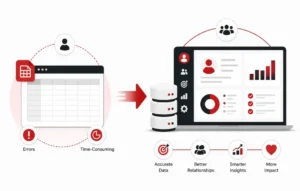
Every nonprofit starts somewhere, and for many that somewhere is a shared Google Sheet with donor names, amounts, and dates in neat columns. It works, until it doesn’t.
A spreadsheet is fine when you have a small, static list and one person managing it. The trouble starts when any of the following becomes true:
- You have more than roughly 150–200 active donors and can no longer scan the sheet to remember who gave what, when.
- More than one staff member edits donor records, and version conflicts or overwritten rows start appearing.
- You want to send different messages to different donor groups (first-time givers, lapsed donors, monthly sustainers) instead of one blast to everyone.
- You need to report retention rate, average gift size, or lifetime value, and you’re manually building pivot tables every quarter.
- Your board or funders ask for a donor pipeline view, and a flat spreadsheet simply can’t show relationship stages.
This is the point where nonprofit donor management stops being a filing exercise and becomes a growth function. A real donor database for nonprofits automates what a spreadsheet forces you to do by hand: dedup checks, gift history rollups, tax receipt generation, and segmentation. The switch typically pays for itself within two or three campaigns, because staff time saved on manual list-building gets redirected into donor communication and cultivation.
That said, graduating too early can also be a mistake. A five-person nonprofit with 40 donors doesn’t need an enterprise CRM with a six-figure implementation timeline. The right moment to move is when data errors, duplicate entries, or missed stewardship touches are visibly costing you gifts, not simply when a vendor’s sales team suggests it’s time.
2. What a Donor Database Must Track (Fields & Segments)
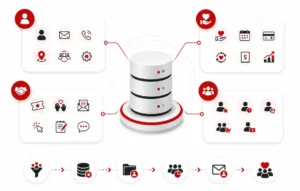
Whatever platform you choose, the database itself only works if it’s structured around the right fields. At minimum, nonprofit donor management should capture:
Core contact fields
- Full name, preferred name, pronouns
- Mailing address, email, phone
- Household or organizational relationships (spouses, family foundations, matched employers)
- Communication preferences and opt-in/opt-out status
Giving history fields
- Every gift: amount, date, campaign, fund designation, payment method
- Recurring gift status and next expected payment date
- Soft credits (gifts made in someone’s honor or influenced by a volunteer ask)
- Pledges and pledge fulfillment status
- Lifetime giving total and largest single gift
Engagement fields
- Event attendance
- Volunteer hours or roles
- Email opens, clicks, and website donation-page visits where the platform integrates with your email tool
- Notes from calls, meetings, or handwritten thank-yous
Segments every organization should be able to build
- First-time donors (for welcome sequences)
- Lapsed donors (no gift in 12-18 months, for win-back campaigns)
- Monthly/recurring sustainers (for retention-focused stewardship)
- Major donors (typically top 10-20% by lifetime giving, for personal outreach)
- Event-only donors who haven’t converted to general giving
If your current system can’t filter and export these segments in a few clicks, the database isn’t doing its job, regardless of how many fields it technically stores. The goal isn’t data for its own sake; it’s the ability to send the right message to the right group without manually sorting a spreadsheet each time.
3. Top Donor Management Tools Compared (Small vs Large Orgs)
There’s no single best donor management software for nonprofits, because “best” depends heavily on organization size, budget, and technical capacity. Here’s a practical way to think about the landscape.
For small nonprofits (under roughly 500 donors, lean or volunteer-run teams):
Donor management software for small nonprofits generally prioritizes simplicity and price over advanced customization. Look for platforms with a low or no monthly minimum, built-in online donation forms, and automated tax receipts. Some of the top tools for nonprofits typically bundle CRM, email, and basic reporting into one plan, which matters when you don’t have a dedicated database administrator. Expect to spend anywhere from free (with transaction fees) up to a few hundred dollars a month.
What to prioritize at this stage: ease of setup, a clean donor-facing giving page, and automatic gift acknowledgment. Advanced features like predictive analytics or AI-driven donor scoring are usually unnecessary overhead for a small team and add training time you don’t have to spare.
For mid-size nonprofits (500-5,000 donors, dedicated development staff):
At this stage, nonprofit donor management software needs to do more: multi-channel campaign tracking, moves-management pipelines for major gift officers, integration with direct mail vendors, and more granular reporting. Pricing usually scales with donor record count or active user seats, often landing in the low-to-mid four figures annually.
For large nonprofits (5,000+ donors, multiple program areas or chapters):
Larger organizations typically need enterprise-grade donor databases for nonprofits with role-based permissions, API access, wealth-screening add-ons, and dedicated account support to handle complex org structures and compliance requirements across regions.
Across all three tiers, the checklist stays the same: Can it dedupe records automatically? Does it integrate with email and accounting tools without a developer? Can non-technical staff build a segment and export a mailing list in under five minutes? If not, the sticker price doesn’t matter. Staff will quietly revert to spreadsheets within a few months.
4. Data Hygiene: Deduplication, Consent & Retention Rules
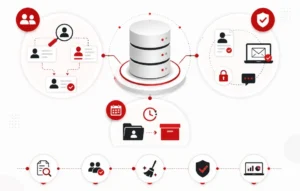
A donor database is only as trustworthy as the data inside it. Poor hygiene is the single biggest reason nonprofits abandon a platform and blame the software instead of the process.
Deduplication
Duplicate records happen constantly: a donor gives online under “Bob Smith” and by mail under “Robert Smith,” or a spouse’s gift gets logged as a separate household. Run a dedup pass at minimum quarterly, and set up your platform’s automatic matching rules (usually based on email and address) so new duplicates don’t accumulate between cleanups. Merging records isn’t just tidiness; unmerged duplicates split a donor’s lifetime giving total in half, which understates who your major donors actually are.
Consent and communication preferences
Every contact record should store how and whether a person consented to be contacted, and through which channel. This matters for compliance with regional data protection rules and for simple donor respect. If someone unsubscribes from email, that preference needs to sync everywhere, including any connected email platform, or you risk mailing someone who explicitly opted out.
Retention rules
Decide, in writing, how long you keep inactive records before archiving them, and document a policy for deceased donor notifications and information requests. Most organizations keep full giving history indefinitely for tax and audit purposes but archive contact records for donors with no engagement in three-plus years, moving them out of active mailing segments while preserving historical data.
A simple hygiene calendar works well for most teams: monthly quick-scan for obvious duplicates, quarterly full dedup and consent audit, and an annual data retention review tied to your fiscal year-end reporting.
5. Using Your Database for Segmented Campaigns
The entire point of clean, structured nonprofit donor management is that it lets you stop sending one message to everyone. Segmentation is where the database earns its keep.
Start with the segments outlined in Section 2 and build a communication plan around each:
- First-time donors get a short welcome series that thanks them, shows early impact, and invites a second, smaller ask before a large one.
- Lapsed donors get a distinct “we miss you” or impact-recap campaign rather than the standard newsletter, since a generic appeal rarely re-engages someone who’s already stopped responding.
- Monthly sustainers get stewardship-focused content, not repeat asks, since they’re already giving consistently and over-soliciting them increases churn.
- Major donors get personal outreach, phone calls, or handwritten notes pulled directly from the database rather than an automated email, since the relationship value justifies the manual touch.
If you want a deeper breakdown of how to build the actual email sequences behind each segment, our donor retention email guide covers lifecycle automation in detail. The database is what makes that kind of segmentation possible in the first place.
The practical workflow is: filter the database by segment, export or sync the list to your email or direct mail tool, run the campaign, then log responses back into the database so the segment definitions stay accurate for next time. Skipping that last step is the most common reason segmented campaigns quietly degrade into blasts again within a year.
6. Integrations: Email, Forms, Accounting
A donor database that sits in isolation creates more manual work than it saves. The tools worth paying for connect cleanly to the rest of your stack.
Email platforms: Your donor database should sync donor records, segments, and unsubscribe status with your email provider automatically, not through manual CSV exports. This is what allows the lifecycle campaigns described in Section 5 to run without someone rebuilding lists every send.
Online giving forms: Every donation form on your website should write directly into the database in real time, capturing amount, campaign, and any custom fields (like tribute gifts or event registration) without a staff member re-keying entries.
Accounting software: Gift data should flow into your accounting system (or at minimum export cleanly), so finance can reconcile deposits against donor records without a separate manual process. This is especially important around fiscal year-end and audit season, when mismatches between development and finance records create real headaches.
If your current system requires manual exports and imports between any of these three, that’s hidden labor cost that should factor into any donor management software for small nonprofits comparison, not just the subscription price. For a broader look at how these platforms stack up on features and pricing across budget tiers, see our full fundraising software comparison.
Not sure if your current setup is holding you back?
Whether you’re still running donor records in spreadsheets or evaluating a switch between platforms, a second set of eyes on your data and martech stack can save months of costly cleanup later.