TL;DR: Google Ad Grants gives eligible nonprofits $10,000/month in free search ad credit, but it comes with a $2 CPC cap, text-ad-only formats, and strict compliance rules that limit reach on competitive terms. Paid Google Ads for nonprofits removes the bid cap and unlocks Display, Video, Shopping, and Performance Max, but it costs real money. Most well-run NGO accounts don’t pick one over the other; they run a hybrid model, using the Grant for awareness and long-tail search, and paid budget for high-intent, donation-focused keywords the Grant can’t win. Below, we break down the core differences, what the $2 CPC cap actually means for your keyword strategy, and a real account structure from our own NGO clients.
Ad Grants vs Paid Ads: The Core Differences (Bids, Formats, Rules)
On the surface, Google Ad Grants and standard Google Ads for nonprofits look similar. Both run on the same auction, both show up on the Google search results page, and both are managed from a Google Ads account. The differences show up once you start building campaigns.
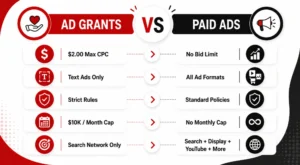
Bidding. Ad Grants accounts are capped at manual CPC bidding with a $2.00 maximum per click (Maximize Conversions can push past this ceiling once conversion tracking is set up, which we’ll cover below). Paid Google Ads accounts have no such cap. You can bid whatever a keyword is worth to your organization.
Formats. Grant-funded campaigns are restricted to text ads on the Search Network only. No Display, no YouTube, no Shopping, no Performance Max, no image or video creative. A google adwords nonprofit grant account simply cannot buy those placements, regardless of budget, because the grant funds Search only.
Compliance rules. Google holds Grant accounts to a higher bar than paid accounts: a minimum 5% click-through rate maintained monthly, at least two ad groups per campaign, at least two ads per ad group, sitelink extensions, geo-targeting, and conversion tracking, among other requirements. Miss these consistently and Google can suspend the account. Paid accounts have none of these grant-specific rules. You’re only bound by standard Google Ads policies.
Budget caps. The Grant is fixed at $10,000/month, distributed as roughly $329/day. Paid Google Ads has no monthly ceiling beyond what you’re willing to spend, which is the trade-off at the center of any google ads non profit budgeting decision.
Understood together, these differences explain why so many nonprofits treat the Grant as a foundation layer rather than a complete acquisition channel. It’s free, but it’s also the most constrained ad product Google offers.
What the $2 CPC Cap Means for Your Keywords
The $2.00 manual bid cap is the single biggest factor shaping what a Grant account can and can’t do. In low-competition niches (a regional literacy program, a hyperlocal shelter, a small environmental charity), $2.00 is often enough to win impressions on relevant terms. In competitive categories, it isn’t close.
Search terms like “donate to children’s charity,” “volunteer opportunities near me,” or category terms tied to health, disaster relief, or well-funded advocacy causes routinely see real auction CPCs well above $2.00, sometimes into double digits. At the manual bid cap, a Grant campaign simply loses those auctions to advertisers, commercial and nonprofit alike, bidding $5, $10, or more.
There are two ways around the ceiling, and both matter for how you plan a google ads non profit keyword strategy:
- Long-tail and low-competition keywords. Multi-word, specific phrases (“volunteer with a literacy nonprofit in [city],” “how to donate school supplies to NGO”) have lower auction pressure and convert at the $2 cap far more often than short, high-volume head terms.
- Maximize Conversions bidding. Once you have conversion tracking (donations, sign-ups, volunteer form fills) properly configured, Google allows Grant accounts to switch from manual CPC to Maximize Conversions, which is exempt from the $2 cap. This is the single biggest lever for extracting more value from a Grant account, and it’s also the step most underused NGO accounts skip.
Even with Maximize Conversions enabled, the Grant account is still working within a fixed $10,000 monthly ceiling and Search-only formats. That’s the structural limit paid Google Ads for nonprofits is built to solve.
When Grants Alone Are Enough, and When They’re Not
For a lot of smaller or newly formed organizations, the Grant genuinely is enough, at least at first. If your cause sits in a low-competition niche, your primary goal is awareness or brand search protection rather than volume donations, and your website converts reasonably well, $10,000 in monthly ad credit can outperform anything a modest paid budget would buy elsewhere.
Grants alone tend to fall short in a few recurring situations:
- High-competition categories. Health nonprofits, disaster relief organizations, and major national causes are bidding against well-funded commercial advertisers and other NGOs for the same head terms. The $2 cap (even with Maximize Conversions) can’t consistently outbid that field.
- Time-sensitive campaigns. Emergency appeals, matching-gift windows, and year-end giving pushes need to scale spend and impressions immediately. A Grant account, bound by its monthly ceiling and CTR compliance requirements, isn’t built for a sudden spike.
- Non-search formats. If your strategy depends on retargeting website visitors, running video pre-roll, or using Shopping ads for a nonprofit retail arm, none of that is available inside the Grant; it’s Search-only by design.
- Donor acquisition at scale. The Grant is genuinely strong for top-of-funnel awareness and branded search, but converting cold traffic into recurring donors at volume usually needs a paid budget with more flexible bidding and formats.
For a deeper walkthrough of setting up and structuring a Grant account from scratch, our guide on Google Ad Grants for nonprofits covers eligibility, application steps, and account setup in detail, worth reading first if you haven’t launched a Grant yet.
The Hybrid Model: Grants for Awareness, Paid for Donations
The organizations getting the most out of Google’s ad ecosystem rarely pick a side. They run a hybrid model that assigns each channel to the job it’s actually good at.
Grant account role: top-of-funnel awareness, brand protection (bidding on your own organization’s name so competitors and confused searchers don’t land elsewhere), educational content promotion, volunteer recruitment, and long-tail informational queries where the $2 cap isn’t a constraint.
Paid account role: competitive donation and fundraising keywords where CPCs exceed $2, time-bound campaigns (year-end giving, emergency appeals, matching gift periods), retargeting site visitors who didn’t convert, and any Display, video, or Shopping format the Grant can’t touch.
The two accounts also feed each other. Grant-driven traffic that engages with blog content or program pages becomes a retargeting audience for paid campaigns. Search terms that perform well but keep losing the $2 auction in the Grant account are strong candidates to move into paid, where they can actually win impression share. This is standard practice across google ads for nonprofits strategy at any organization running both channels seriously, and it’s the structure we recommend to nearly every NGO client once their Grant account is stable.
Our Educate Girls case study shows this in practice – a hybrid approach that combined high Grant utilization for awareness with paid channels driving one-time and monthly donor growth, resulting in a 2x ROAS from paid spend alongside 90% Grant utilization.
Also Read: How Nonprofits Can Use Google Ad Grants to Drive Impact
Real Structure Example From Our NGO Accounts
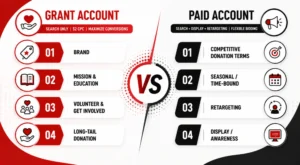
Here’s a simplified version of the account structure we use across several nonprofit clients, adapted from real campaigns without disclosing client-specific budgets:
Grant account (Search, $2 CPC / Maximize Conversions):
- Campaign 1 – Brand: organization name, misspellings, “[org name] reviews,” “[org name] donate”
- Campaign 2 – Mission & Education: informational queries tied to the cause (“what is [issue] and how to help,” “[issue] statistics”)
- Campaign 3 – Volunteer & Get Involved: “volunteer with [cause] NGO,” “internships at nonprofit [sector]”
- Campaign 4 – Long-tail Donation: specific, lower-competition giving queries (“donate school kits to rural children,” “sponsor a child’s education India”)
Paid account (Search + Display + retargeting, flexible bidding):
- Campaign 1 – Competitive Donation Terms: high-CPC head terms losing the Grant auction (“donate to education charity,” “child sponsorship program”)
- Campaign 2 – Seasonal/Time-bound: year-end giving, Giving Tuesday, disaster response appeals
- Campaign 3 – Retargeting: website visitors, blog readers, abandoned donation-form users
- Campaign 4 – Display/Awareness: banner placements on relevant content networks for cold-audience reach
This structure keeps the Grant account fully compliant (adequate ad groups, CTR above 5%, active conversion tracking) while directing paid spend only at the keywords and formats where it earns a clear return the Grant can’t deliver on its own. It’s a pattern that applies whether you’re running a google adwords nonprofit grant account for the first time or optimizing one that’s been live for years.
Cost Modelling: What Paid Ads Add
Before adding a paid budget on top of a Grant account, it helps to model what that spend actually buys, rather than assuming more budget automatically means more donations.
Start with the gap analysis: pull the Grant account’s Search Terms report and flag keywords with impression share loss due to rank (a Google Ads column that shows how often you’re losing auctions to a low bid or Quality Score). These are the terms where a $2 cap is actively costing you visibility, and they’re the first candidates for paid budget.
From there, a simple cost model looks at:
- Estimated CPC for the target keyword set – pull actual auction data from Google Ads’ Keyword Planner or your existing Search campaigns, not the flat $2 Grant ceiling.
- Expected conversion rate from historic Grant or organic performance on similar intent keywords.
- Cost per acquisition (CPA) – budget divided by expected conversions, compared against average gift value and, for monthly donors, expected lifetime value.
- Incremental reach – how much of the competitive keyword set the Grant is currently losing, and what percentage a modest paid budget (even ₹15,000–₹50,000/month or a few hundred dollars) could realistically recover.
In our experience managing both Grant and paid accounts for NGO clients, even a modest paid budget layered on top of a well-optimized Grant account tends to outperform doubling down on Grant-only tactics, simply because it’s targeting the exact keywords the $2 cap is currently blocking. The Grant remains the larger dollar value on paper ($120,000/year in credit), but paid spend is what converts the keywords the Grant structurally can’t reach.
Not sure whether your current Google Ads or Ad Grant account is structured to actually convert? Get a free Ad Account Structure Review from Orvador’s NGO team, and we’ll show you exactly where your Grant is underperforming and where paid budget would move the needle.